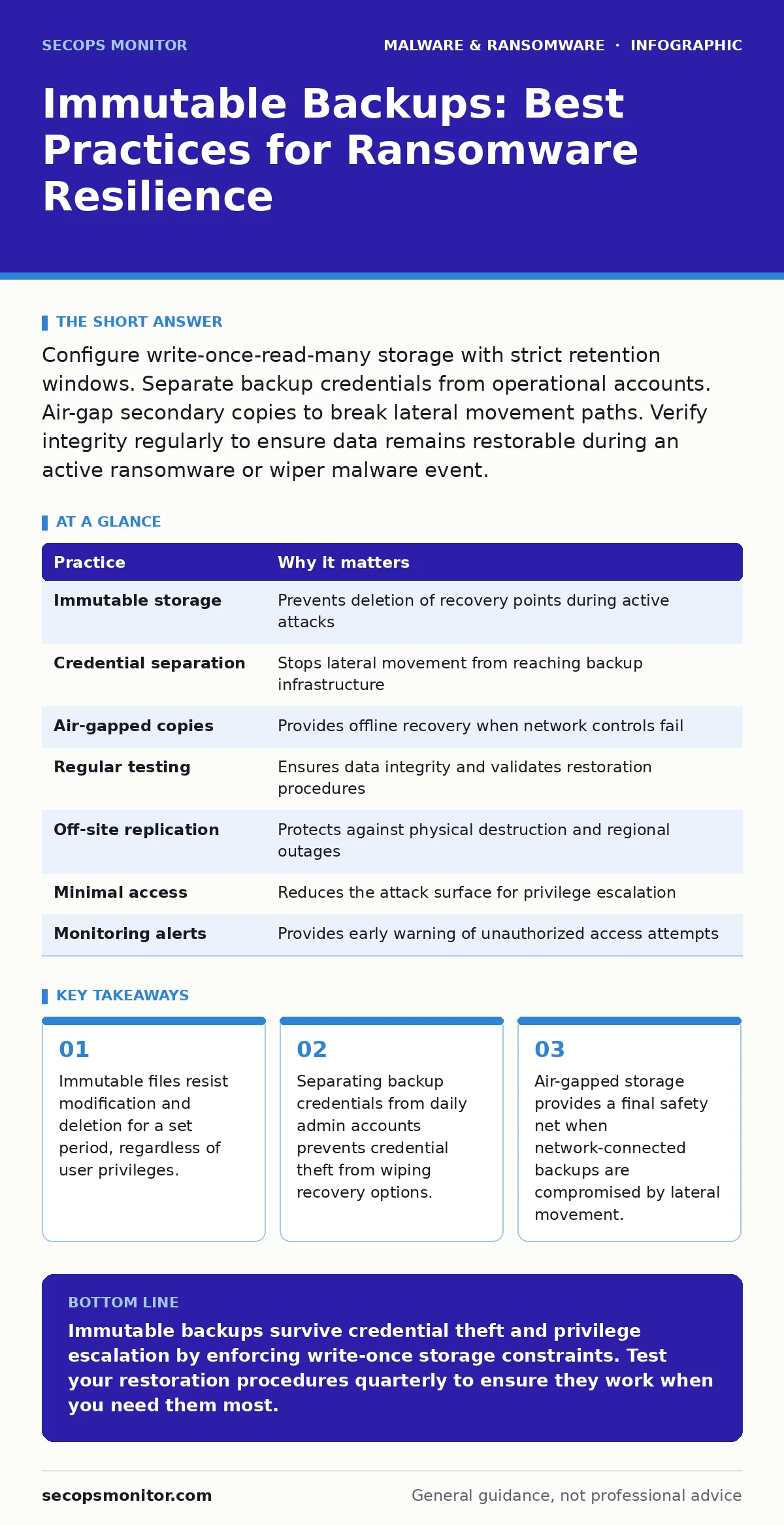
Configure write-once-read-many storage with strict retention windows. Separate backup credentials from operational accounts. Air-gap secondary copies to break lateral movement paths. Verify integrity regularly to ensure data remains restorable during an active ransomware or wiper malware event.
Defining the Immutable Storage Contract
Immutable storage operates on a write-once, read-many principle. Once data is written to this storage medium, it cannot be altered or deleted for a predetermined retention period. This mechanism differs from standard read-only permissions, which an administrator can change.
This distinction matters because attackers who compromise admin credentials can often disable standard protections. They cannot override the cryptographic or hardware-enforced immutability window. You gain a guaranteed recovery point that survives privilege escalation.
Separating Credential Hierarchies
Operational accounts must never hold keys to backup infrastructure. If an attacker compromises a standard admin account, they should not immediately access your recovery data. This separation creates a barrier against automated scripts that escalate privileges.
Use a dedicated identity provider for backup systems. This provider should have no trust relationship with the primary domain controller. The backup administrator role should require multi-factor authentication that differs from the primary network MFA method.
This isolation ensures that even if you face a breach involving credential dumping, the backup keys remain secure. You force the attacker to jump through distinct security controls to reach your data.
| Practice | Why it matters |
|---|---|
| Immutable storage | Prevents deletion of recovery points during active attacks |
| Credential separation | Stops lateral movement from reaching backup infrastructure |
| Air-gapped copies | Provides offline recovery when network controls fail |
| Regular testing | Ensures data integrity and validates restoration procedures |
| Off-site replication | Protects against physical destruction and regional outages |
| Minimal access | Reduces the attack surface for privilege escalation |
| Monitoring alerts | Provides early warning of unauthorized access attempts |
Implementing Air-Gapped Secondary Copies
Network-connected backups, even immutable ones, exist within the attack surface. Sophisticated threats may discover vulnerabilities in the backup appliance itself. An air-gapped copy exists on media that is physically disconnected from the network.
This physical separation breaks the chain of lateral movement. An attacker cannot remotely wipe or encrypt data that is not reachable. You must establish a routine for swapping media or updating offline snapshots.
The trade-off is operational friction. Restoring from air-gapped media takes longer than network recovery. You balance speed against survival, ensuring you have a last resort when all networked controls fail.
Validating Data Integrity Regularly
Creating backups is insufficient if the data is corrupted or incomplete. You must verify that files can be read and restored without error. Corruption can occur silently due to storage faults or subtle malware that alters file headers.
Schedule automated integrity checks that compare checksums. These checks should run without human intervention to ensure consistency. If a check fails, you must investigate immediately rather than waiting for a disaster.
This practice catches storage degradation early. It also identifies if an attacker has managed to inject malicious code into the backup stream, which can happen if source systems are infected before the backup window closes.
Restricting Access to the Minimum Necessary
Broad access to backup systems invites risk. Every account with access represents a potential entry point for attackers. Limiting access reduces the likelihood of credential theft leading to backup destruction.
Grant access only to personnel who perform backup management tasks. Remove access immediately when roles change or employees leave. Use just-in-time access models where possible, requiring approval for each session.
This principle aligns with least privilege. It ensures that even if a user account is compromised, the attacker cannot reach the backup infrastructure without additional, specific credentials.
Monitoring for Anomalous Backup Behavior
Backup systems generate logs that reveal unusual activity. Sudden changes in backup size, frequency, or duration can indicate tampering. Monitoring these metrics provides early warning of an ongoing attack.
Set alerts for deviations from baseline behavior. A backup job that completes significantly faster than usual may indicate that data is being skipped or deleted. A job that fails repeatedly may signal an attacker blocking the process.
Integrate these alerts into your security operations center workflow. Rapid response to these anomalies can prevent an attacker from destroying your recovery options before you detect the breach.
Testing Restoration Procedures Frequently
A backup is only as good as its restoration process. Many organizations neglect testing, assuming that the existence of a backup guarantees recovery. This assumption fails when procedures are outdated or documentation is missing.
Conduct restoration tests quarterly. Restore random files and full system images to a isolated environment. Measure the time required and identify any steps that cause delays or errors.
This testing reveals gaps in your documentation and training. It also validates that your immutable storage is functioning correctly and that credentials are valid when needed.
Addressing the Human Factor in Recovery
Technical controls fail when procedures are unclear under pressure. Staff must know exactly who has authority to initiate a restore from immutable or air-gapped storage. Ambiguity leads to delays during an incident.
Develop a clear runbook for backup recovery. Define roles, responsibilities, and decision thresholds. Train staff regularly using tabletop exercises that simulate a ransomware attack.
This preparation reduces panic and ensures coordinated action. It also helps identify weak points in your technical controls before a real event occurs.
Integrating with Broader Defense Strategies
Immutable backups are not a standalone solution. They work best when combined with other defense layers. For instance, understanding malware behavior helps you tune detection systems.
Consider how script blocking prevents attackers from automating the wiping of backups. Combine this with heuristic detection to identify novel threats that bypass traditional signatures.
If you face a sophisticated attack, you may need to reimage infected computers entirely. Immutable backups provide the clean data for this process. This integration ensures a cohesive defense rather than isolated controls.
Key takeaways
- Immutable files resist modification and deletion for a set period, regardless of user privileges.
- Separating backup credentials from daily admin accounts prevents credential theft from wiping recovery options.
- Air-gapped storage provides a final safety net when network-connected backups are compromised by lateral movement.
Immutable backups survive credential theft and privilege escalation by enforcing write-once storage constraints. Test your restoration procedures quarterly to ensure they work when you need them most.
Frequently asked questions
Can an administrator delete immutable backups in an emergency?
No. The immutability window prevents deletion by anyone, including administrators, until the retention period expires. This design ensures that even compromised admin accounts cannot erase recovery points.
How long should the immutability retention period be?
Set the period based on your detection capabilities. It should be long enough to detect and respond to an intrusion but not so long that it impedes operational updates. Balance security needs with business requirements.
Does immutability protect against storage hardware failure?
No. Immutability protects against malicious modification and deletion. It does not prevent data loss from hardware failure, corruption, or natural disasters. You still need redundant storage and off-site copies.
Can attackers bypass immutability by targeting the backup appliance?
Attackers may exploit vulnerabilities in the backup software or appliance OS. However, they cannot delete the immutable data blocks stored on the media. Regular patching and air-gapped copies mitigate this risk.
How this guide was produced: written by the SecOps Monitor editorial team with AI assistance, checked against the public references listed below, and reviewed when the facts change. See our editorial policy or report an error.