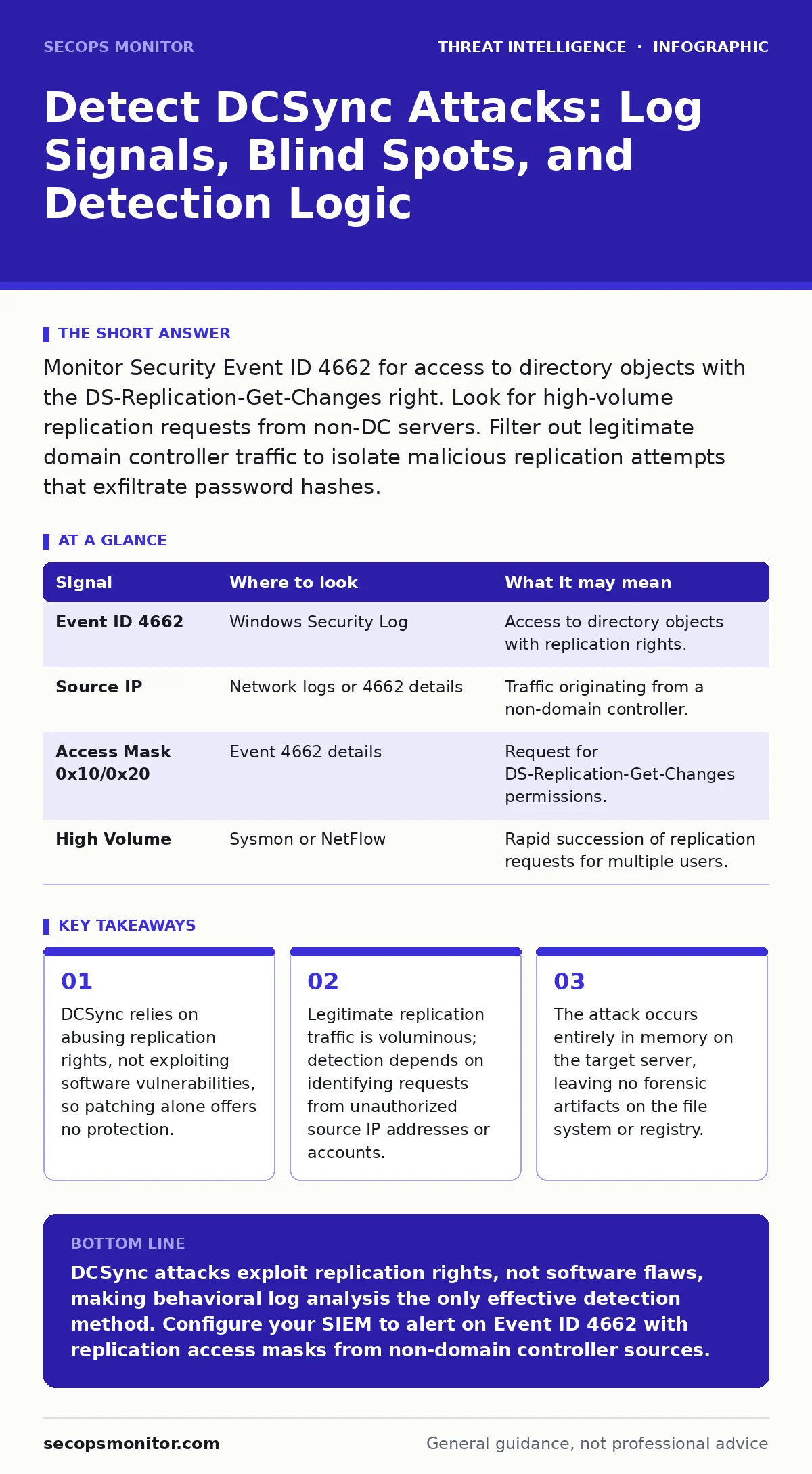
Monitor Security Event ID 4662 for access to directory objects with the DS-Replication-Get-Changes right. Look for high-volume replication requests from non-DC servers. Filter out legitimate domain controller traffic to isolate malicious replication attempts that exfiltrate password hashes.
The Mechanics of Credential Harvesting
Directory Credential Synchronization, commonly known as DCSync, is an abuse of the Active Directory replication protocol. It allows an attacker to request password hashes from a domain controller without needing to be physically present on that server. The attacker does not need to dump the SAM database or install local agents. Instead, they impersonate a domain controller and request replication data. This method bypasses many traditional endpoint detection tools because the activity appears as standard directory service communication.
The core requirement for this attack is the DS-Replication-Get-Changes permission on the domain object. By default, accounts with Domain Admin privileges hold this right. If an attacker compromises any account with this privilege, they can replicate the entire directory. This includes the password hashes for every user, computer, and service account in the domain. The attack is purely network-based and leverages built-in directory services features.
Identifying the Source of Replication Requests
The first layer of detection involves identifying who is initiating the replication. In a healthy environment, only domain controllers initiate replication requests to other domain controllers. Any other server or workstation attempting to replicate directory data is a strong indicator of compromise. You must monitor for replication requests originating from non-domain controller IP addresses.
Check the source IP address against your inventory of known domain controllers. If a request comes from a member server, a workstation, or an unexpected virtual machine, it is likely malicious. Attackers often use compromised service accounts or stolen credentials to initiate these requests. The source account will typically have high privileges, such as Domain Admin or Enterprise Admin. This distinction is critical because legitimate administrative tasks rarely require direct replication from a non-DC host.
Analyzing Security Event Logs
Windows Security logs provide the primary evidence for DCSync activity. You need to focus on Event ID 4662, which logs directory service access. This event records when a user or process accesses an object in Active Directory. The key is to filter these events for specific access masks and object types.
Look for accesses to the Directory Object class. The access mask should include 0x10 or 0x20, which correspond to DS-Replication-Get-Changes and DS-Replication-Get-Changes-All-Objects. These flags indicate that the requester is trying to pull replication data. The target object is usually the domain itself, represented by the domain's distinguished name. If you see these specific flags on a non-DC source, you have a high-confidence alert.
| Signal | Where to look | What it may mean |
|---|---|---|
| Event ID 4662 | Windows Security Log | Access to directory objects with replication rights. |
| Source IP | Network logs or 4662 details | Traffic originating from a non-domain controller. |
| Access Mask 0x10/0x20 | Event 4662 details | Request for DS-Replication-Get-Changes permissions. |
| High Volume | Sysmon or NetFlow | Rapid succession of replication requests for multiple users. |
Distinguishing Noise from Attacks
Active Directory replication is a constant, high-volume process. Domain controllers replicate changes to each other frequently to maintain consistency. This legitimate traffic generates a massive amount of Event ID 4662 logs. If you alert on every replication request, your monitoring system will be overwhelmed by noise. You must establish a baseline of normal replication behavior.
Filter out traffic between known domain controllers. These servers have a trusted relationship and are expected to replicate data. Any replication request that does not fit this pattern requires investigation. Additionally, look at the time of day. Replication often happens on a schedule or in response to changes. A burst of replication requests from a single source account outside of normal maintenance windows is suspicious.
Advanced Detection with Sysmon
Windows Event Log filtering can miss some details, especially if logging is not configured deeply. System Monitor, or Sysmon, provides more granular visibility into process and network activity. You can configure Sysmon to log all network connections and process creations. This helps you see the tool the attacker used to initiate the DCSync request.
Attackers often use tools like Mimikatz or custom scripts to perform DCSync. These tools create processes that connect to the domain controller on the RPC endpoint mapper port. Sysmon Event ID 3 logs network connections. You can correlate this with Event ID 1 for process creation. If you see a process like powershell.exe or cmd.exe connecting to a domain controller on the RPC port, and that process was spawned by a user account with replication rights, it is a strong indicator of abuse.
See also: Diamond Model of Intrusion Analysis Explained Simply · What Is Incident Triage: A Field Manual for First Response
Common Blind Spots in Monitoring
Many organizations miss DCSync attacks because they focus on the wrong logs. They monitor for local login failures or file access changes, which do not occur during this attack. The attack happens entirely in the memory of the domain controller. No files are created, modified, or deleted on the target system. The only trace is the network request and the security log entry for the access right.
Another blind spot is the use of legitimate administrative accounts. If an attacker steals the credentials of a Domain Admin, the replication request looks exactly like a legitimate administrator performing a task. Behavioral analysis is the only way to detect this. You must ask why a Domain Admin is replicating the entire directory from a non-DC server. Standard administrative tasks do not require this level of access.
Integrating with Threat Intelligence
Understanding the tactics, techniques and procedures (TTPs) of advanced persistent threats helps you refine your detection logic. These groups often use DCSync as a late-stage technique to harvest credentials for lateral movement. By integrating threat intelligence feeds that track this specific technique, you can prioritize alerts that match known adversary behavior. This context helps you distinguish between a misconfigured administrator and a targeted intrusion.
Key takeaways
- DCSync relies on abusing replication rights, not exploiting software vulnerabilities, so patching alone offers no protection.
- Legitimate replication traffic is voluminous; detection depends on identifying requests from unauthorized source IP addresses or accounts.
- The attack occurs entirely in memory on the target server, leaving no forensic artifacts on the file system or registry.
DCSync attacks exploit replication rights, not software flaws, making behavioral log analysis the only effective detection method. Configure your SIEM to alert on Event ID 4662 with replication access masks from non-domain controller sources.
Frequently asked questions
Can DCSync be performed by a standard user?
No, the attacker must have an account with the DS-Replication-Get-Changes permission, which is typically held by Domain Admins or Enterprise Admins.
Does DCSync require the attacker to be on the same network?
No, as long as the attacker can communicate with the domain controller over the RPC port, they can initiate the request from any location with network access.
How do I stop DCSync if I detect it?
Immediately disable the compromised account and reset its password. Then, audit all accounts with replication permissions and remove unnecessary rights.
Is DCSync the same as Golden Ticket attacks?
No, DCSync is a method to steal password hashes. Golden Ticket is a method to forge authentication tickets using those stolen hashes. DCSync is often a precursor to Golden Ticket.
How this guide was produced: written by the SecOps Monitor editorial team with AI assistance, checked against the public references listed below, and reviewed when the facts change. See our editorial policy or report an error.