You need both. A firewall blocks unauthorized network connections, but it cannot stop malware hidden in an email attachment. Antivirus software detects and removes malicious files on your device, but it cannot prevent an attacker from scanning your open ports. They serve distinct, non-overlapping roles in your security stack.
What Does Traffic Control Actually Prevent?
Imagine a guard standing at the entrance of a building. This is how a firewall operates. It inspects data packets moving between your network and the internet. It decides whether to allow or deny traffic based on predefined rules. These rules often reference IP addresses, ports, or protocols.
The firewall does not open the data packet to read its contents. It checks the envelope, not the letter inside. If a connection requests access to a port you have closed, the firewall drops it. This stops external scanners and unauthorized remote access attempts. However, if you invite a friend in, the guard lets them pass.
If that friend carries a weapon, the guard does not know. A firewall cannot see if a downloaded file is malicious. It only sees that you authorized the connection. This is why a firewall alone leaves your system exposed to content-based threats.
How Does Endpoint Detection Find Hidden Threats?
Antivirus software lives on the individual device, not at the network edge. It scans files as they are created, modified, or executed. It compares file characteristics against a database of known threats. This database contains signatures, which are unique identifiers for specific malware strains.
Modern antivirus tools also use heuristic analysis. This method looks for suspicious behavior rather than exact matches. If a program tries to modify system files unexpectedly, the software may quarantine it. This catches new variants that do not yet have a known signature.
The antivirus solution works regardless of how the file arrived. It does not care if the file came through an email, a USB drive, or a web download. It only cares about what the file does on your disk. This makes it effective against threats that bypass network controls.
When Does Network Filtering Fail?
Suppose you receive an email from a trusted colleague. The email contains a PDF attachment. The connection to the mail server was legitimate, so the firewall allowed it through. The antivirus software on your server might scan the attachment and find nothing.
Now you open the PDF on your workstation. If your workstation lacks endpoint protection, the malicious code inside the PDF executes. The firewall sees only normal web traffic when the malware phones home. It assumes the outbound connection is legitimate because it uses standard ports.
This scenario highlights a critical gap. The firewall protected the perimeter, but the threat originated from allowed traffic. The lack of local scanning allowed the malware to establish a foothold. This is why relying solely on network controls is insufficient for modern threats.
When Does Signature Scanning Fall Short?
Imagine an attacker identifies an open port on your server. They send a specially crafted packet to exploit a vulnerability in the service running on that port. This is a remote code execution attack. The antivirus software on the server scans files, but the attack happens in memory.
The malicious code never touches the disk as a file. It executes directly in the process space. The antivirus software has nothing to scan because there is no file to analyze. The attack succeeds before any file-based detection can occur.
This is where the firewall’s role becomes critical. If the firewall blocked access to that specific port, the attacker never reaches the vulnerable service. The firewall prevents the interaction entirely. This demonstrates why host-based security cannot replace network segmentation.
Situations Favoring One Over the Other
Different environments require different primary defenses. The choice depends on what you are trying to protect and where the threat originates. Consider the following scenarios to determine which tool offers the best initial layer of defense.
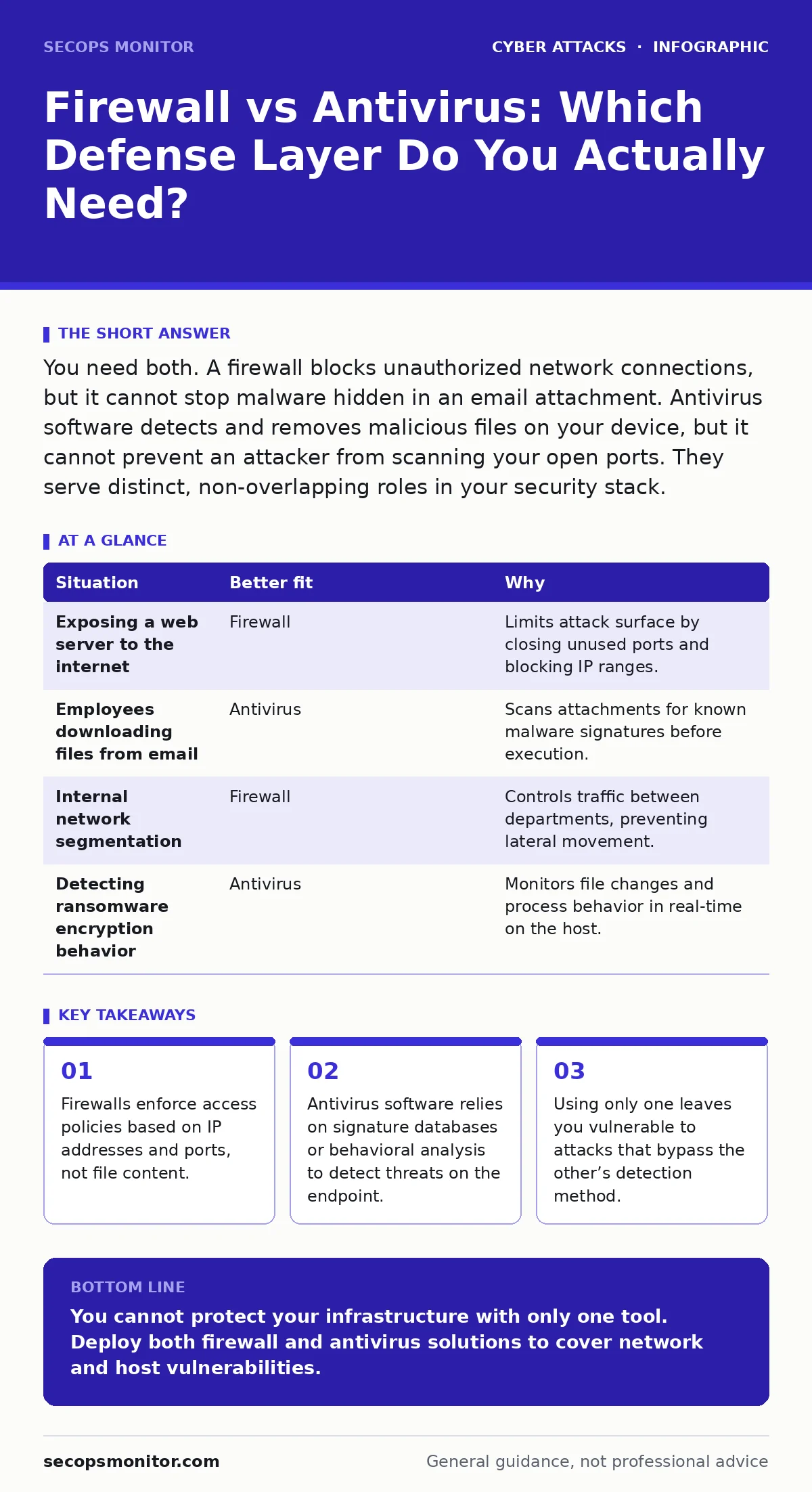
| Situation | Better fit | Why |
|---|---|---|
| Exposing a web server to the internet | Firewall | Limits attack surface by closing unused ports and blocking IP ranges. |
| Employees downloading files from email | Antivirus | Scans attachments for known malware signatures before execution. |
| Internal network segmentation | Firewall | Controls traffic between departments, preventing lateral movement. |
| Detecting ransomware encryption behavior | Antivirus | Monitors file changes and process behavior in real-time on the host. |
See also: What Is Ransomware Protection: How to Stop Encryption Attacks
Combining Layers for Defense in Depth
You should not choose between a firewall and antivirus software. You must use both. This approach is known as defense in depth. It assumes that one layer will fail or be bypassed. The next layer provides a backup mechanism to detect or stop the threat.
The firewall reduces the volume of threats reaching your endpoints. This lowers the workload on your antivirus software. The antivirus software catches what slips through the firewall. This includes insider threats and malware introduced via removable media.
Integrating these tools provides visibility. You can see network anomalies at the perimeter and file anomalies on the host. Correlating these logs helps you identify complex attacks. This holistic view is necessary for modern cyber hygiene.
Handling Zero-Day and Advanced Tactics
Even with both tools, advanced attackers can bypass standard defenses. They may use encryption to hide their traffic from the firewall. They may use fileless techniques to avoid antivirus detection. This is why you must supplement these tools with other measures.
Consider implementing zero trust security principles. This model assumes no user or device is trusted by default. It verifies every request, regardless of origin. This adds a layer of identity verification that firewalls and antivirus tools lack.
Additionally, security awareness training reduces the risk of social engineering. If users do not open malicious attachments, the antivirus software never needs to scan them. Combining technical controls with human factors creates a more resilient environment.
Key takeaways
- Firewalls enforce access policies based on IP addresses and ports, not file content.
- Antivirus software relies on signature databases or behavioral analysis to detect threats on the endpoint.
- Using only one leaves you vulnerable to attacks that bypass the other’s detection method.
You cannot protect your infrastructure with only one tool. Deploy both firewall and antivirus solutions to cover network and host vulnerabilities.
Frequently asked questions
Can a firewall replace antivirus software?
No. A firewall controls network traffic but cannot inspect files for malware signatures or malicious behavior on the endpoint.
Does antivirus software block network attacks?
No. Antivirus software scans files and processes on the device. It does not filter network packets or block unauthorized connections at the perimeter.
Is cloud-based protection better than local tools?
Cloud solutions offer centralized management and updated threat intelligence. However, local agents are still required to scan endpoints and enforce policies in real-time.
Do I need a firewall if I am behind a router?
Standard home routers have basic firewall features. For professional environments, dedicated firewalls provide granular control, logging, and advanced threat detection capabilities.
How this guide was produced: written by the SecOps Monitor editorial team with AI assistance, checked against the public references listed below, and reviewed when the facts change. See our editorial policy or report an error.