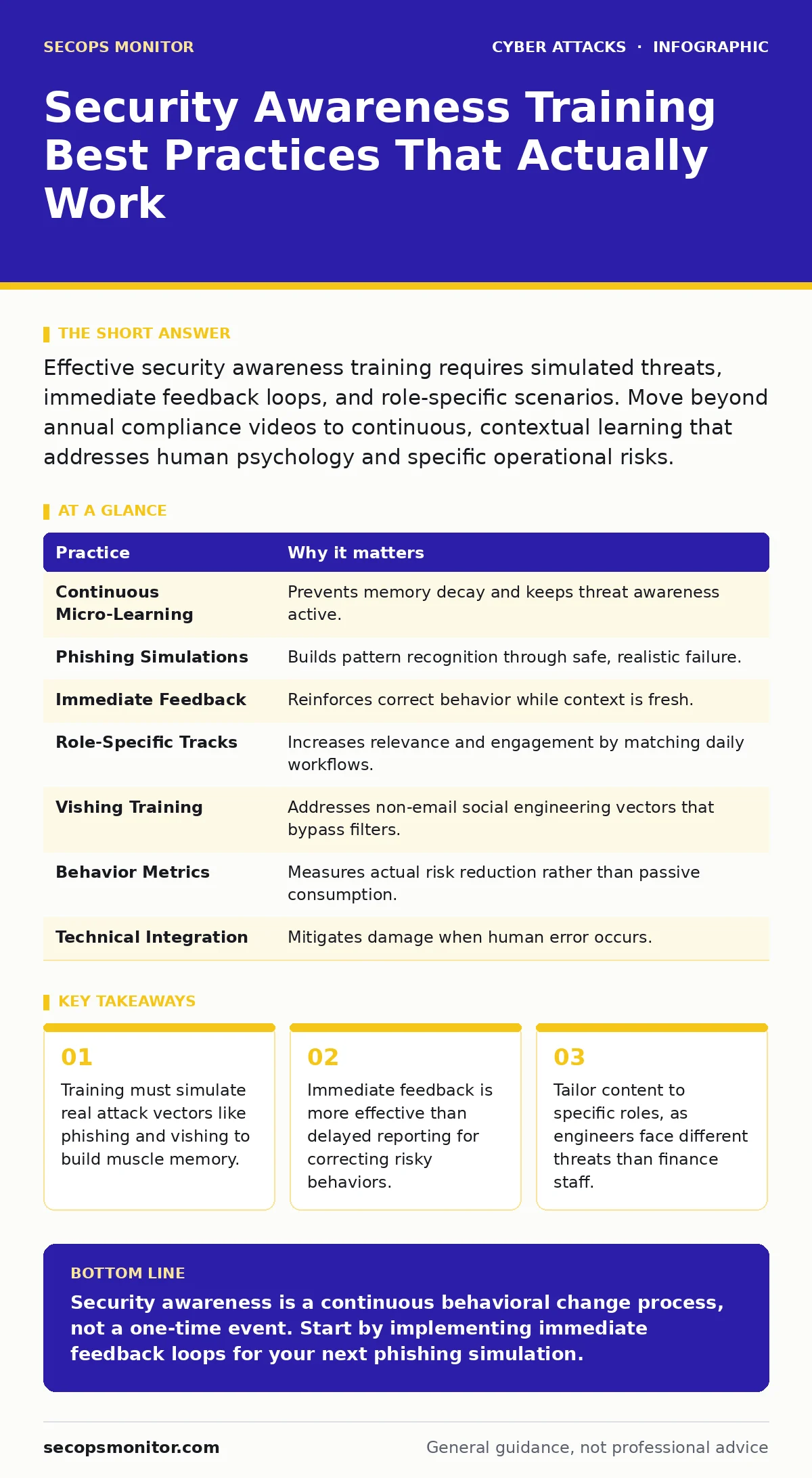
Effective security awareness training requires simulated threats, immediate feedback loops, and role-specific scenarios. Move beyond annual compliance videos to continuous, contextual learning that addresses human psychology and specific operational risks.
Move Beyond Annual Compliance Videos
Most organizations treat security awareness as a yearly checkbox. This approach assumes that reading a policy once creates lasting behavioral change. It does not. Human memory decays rapidly, and the context of a static video rarely matches the pressure of a real incident. You need continuous reinforcement that integrates into the daily workflow.
Suppose an employee watches a video about password security in January. By July, the urgency has faded. When a suspicious login request appears, they click through because the consequence feels abstract. Continuous micro-learning keeps the threat model active in your mind without causing fatigue.
1. Implement Continuous Micro-Learning
Break training into short, frequent modules rather than long seminars. This reduces cognitive load and improves retention. Schedule these modules to align with current threats or seasonal changes in workflow.
- Tip: Deploy five-minute interactive modules monthly rather than a two-hour annual session.
Simulate Realistic Attack Vectors
Theory does not prepare you for the adrenaline of a real attack. You must experience the deception in a controlled environment. This builds pattern recognition that textbooks cannot provide. The goal is to catch yourself making a mistake before an adversary does.
Imagine receiving an email that looks identical to your internal HR portal. The sender address is slightly off, but the logo and tone are perfect. If you have only read about this, you might miss the detail. If you have clicked similar simulations, your brain flags the anomaly faster.
2. Run Contextual Phishing Simulations
Send simulated phishing emails that mirror current campaigns. Vary the templates to test different cognitive biases, such as urgency or curiosity. Ensure the simulation engine can track who clicks, who enters credentials, and who reports the message.
- Tip: Rotate simulation themes every quarter to prevent users from memorizing specific fake templates.
Provide Immediate Feedback Loops
The gap between action and consequence determines learning speed. If you click a malicious link and hear nothing for weeks, the lesson is lost. Immediate correction reinforces the correct behavior while the context is still fresh. This turns a failure into a teachable moment.
Suppose you fall for a simulated attack. A generic "you failed" email is demoralizing and useless. A specific explanation of what you missed—such as the mismatched URL or the unusual sender domain—provides the data needed to improve.
3. Automate Instant Educational Feedback
Configure your simulation platform to trigger an educational popup the moment a user interacts with a test threat. This popup should explain the specific red flags they missed. Keep the tone supportive, not punitive.
- Tip: Use positive reinforcement for users who report simulations, as reporting is the desired behavior.
Tailor Content to Specific Roles
A one-size-fits-all approach ignores operational reality. Engineers interact with code repositories and build servers. Finance staff handle wire transfers and invoices. Their risk profiles are fundamentally different. Generic advice often feels irrelevant and is therefore ignored.
Imagine a developer receiving training on CEO fraud. While relevant, they are more likely to be targeted by supply chain attacks or compromised API keys. Tailoring the content ensures the threat model matches their daily tools and access levels.
4. Create Role-Specific Training Tracks
Develop distinct learning paths for different departments. Include technical details for IT staff and social engineering scenarios for customer-facing roles. This respects their expertise and addresses their actual exposure points.
- Tip: Interview department heads to identify the specific tools and workflows they use, then build scenarios around those assets.
Address Social Engineering Beyond Email
Email is a common vector, but it is not the only one. Attackers increasingly use voice calls to bypass email filters and security software. This method, known as vishing, relies on the perceived authority of a human voice. It exploits the social pressure to be helpful or compliant.
Suppose you receive a call from someone claiming to be from IT support. They say your account is locked and ask for your password to "unlock" it. The caller sounds professional and urgent. Without specific training on voice-based deception, you may comply out of politeness or fear.
5. Train for Vishing and Pretexting
Include audio simulations and scripts that mimic phone-based attacks. Teach users to verify identities through independent channels. Emphasize that legitimate support staff will never ask for credentials over the phone.
- Tip: Create a standard verification script that employees can use to hang up and call back via a known official number.
Measure Behavior, Not Just Completion
Tracking who finished a video tells you nothing about security posture. You need metrics that reflect actual risk reduction. Look at reporting rates, click rates on simulations, and time-to-report. These data points reveal where your defenses are weak.
This indicates users are passive. They watch the content but do not engage with their environment. Shift your focus from consumption to interaction.
6. Track Leading Indicators of Security
Track the average time it takes for a user to report a suspicious message. Use these metrics to adjust training frequency and content.
- Tip: Set baseline metrics for each department and track improvement over time, rather than comparing departments to each other.
Integrate with Technical Controls
Training alone is not a control. It is a layer of defense that works best when combined with technical safeguards. If a user fails to recognize a threat, your systems should still limit the damage. This concept aligns with zero trust security, where no user or device is trusted by default.
Suppose an employee clicks a malicious link and enters credentials. Without multi-factor authentication, the attacker gains access. With it, the stolen password is useless. Training reduces the likelihood of the click; technical controls mitigate the impact.
7. Combine Training with Account Lockout Policies
Ensure your technical policies enforce limits on failed login attempts and require re-authentication for sensitive actions. This provides a safety net when human judgment fails. Review these policies regularly to ensure they balance security with usability.
- Tip: Align training content with your specific technical controls so users understand why certain restrictions exist.
| Practice | Why it matters |
|---|---|
| Continuous Micro-Learning | Prevents memory decay and keeps threat awareness active. |
| Phishing Simulations | Builds pattern recognition through safe, realistic failure. |
| Immediate Feedback | Reinforces correct behavior while context is fresh. |
| Role-Specific Tracks | Increases relevance and engagement by matching daily workflows. |
| Vishing Training | Addresses non-email social engineering vectors that bypass filters. |
| Behavior Metrics | Measures actual risk reduction rather than passive consumption. |
| Technical Integration | Mitigates damage when human error occurs. |
Address Cognitive Biases Directly
Attackers exploit how you think, not just what you know. Urgency, fear, and authority are psychological triggers that bypass rational analysis. Training must explicitly discuss these biases. Understanding that you are being manipulated is the first step to resisting it.
Imagine an email stating your account will be deleted in one hour. Your brain enters a stress response, narrowing your focus. You stop checking details and start looking for a way to relieve the pressure. Recognizing this physiological response helps you pause and verify.
8. Teach Bias Recognition
Include modules that explain common cognitive biases like urgency and reciprocity. Provide examples of how these biases are used in attacks. Encourage users to pause and verify when they feel pressured to act quickly.
- Tip: Use hypothetical scenarios that highlight the emotional manipulation tactics used by attackers.
Key takeaways
- Training must simulate real attack vectors like phishing and vishing to build muscle memory.
- Immediate feedback is more effective than delayed reporting for correcting risky behaviors.
- Tailor content to specific roles, as engineers face different threats than finance staff.
Security awareness is a continuous behavioral change process, not a one-time event. Start by implementing immediate feedback loops for your next phishing simulation.
Frequently asked questions
How often should security awareness training occur?
Training should be continuous, with micro-modules delivered monthly or bi-weekly to maintain awareness without causing fatigue.
Is gamification effective for security training?
Gamification can increase engagement, but it must be tied to real-world scenarios and immediate feedback to be effective.
How do you measure the ROI of security training?
Measure reductions in click rates on simulations, increases in reporting rates, and a decrease in actual security incidents involving human error.
Should training include technical details?
Yes, but tailored to the role. Technical staff need details on exploits and logs, while general staff need to recognize social engineering cues.
How this guide was produced: written by the SecOps Monitor editorial team with AI assistance, checked against the public references listed below, and reviewed when the facts change. See our editorial policy or report an error.