Watch for urgent requests to move funds quickly, especially via wire transfer. Note any changes in email addresses, unusual grammar, or requests to bypass standard approval workflows. Verify all financial instructions through a separate, trusted communication channel before taking action.
The Illusion of Authority
Imagine receiving an email from your CEO asking for an immediate wire transfer. The message is brief, polite, and demands discretion. This is the core of CEO fraud, also known as business email compromise. The attacker does not need to hack your firewall. They only need to convince you that the request is legitimate.
The power dynamic works against you. You are conditioned to respect hierarchy and act quickly when leadership speaks. Attackers exploit this psychological shortcut. They create a scenario where questioning the request feels like insubordination or inefficiency.
Signs You Notice First
The most obvious red flags often appear in the content and context of the message. You will likely see a demand for speed. The attacker wants you to act before you have time to verify the details.
Look for requests that break your normal procedures. If your company requires two signatures for payments, the attacker will ask you to skip that step due to "emergency" circumstances. They may also ask you to keep the transaction secret from your finance team or manager. This isolation prevents others from spotting the error.
Signs That Are Easy to Miss
The subtle signs are often technical or behavioral. They require you to look beyond the text of the message. One common tactic is domain impersonation. Attackers register a domain that looks almost identical to your company’s official domain.
For example, if your company is "Acme Corp," they might use "Acme-Corp.com" or "Acme.Support.com." The difference is a single hyphen or word. Your eye skips over it because the email client displays the display name, not the raw address. You must hover over the sender’s name to see the actual email address.
Another hidden sign is the use of compromised accounts. The email may come from your CEO’s actual email address. The attacker has stolen the credentials, not spoofed the address. This means the email passes standard authentication checks. It arrives in your primary inbox, not your junk folder. This is why security awareness training is vital for recognizing behavioral anomalies, even when the technical headers look correct.
The Urgency Trap
Attackers manufacture crisis. They claim a deal is closing, a vendor is threatening to leave, or a legal settlement is pending. The goal is to induce stress. Under stress, your brain shifts from analytical thinking to reactive mode. You stop checking facts and start looking for solutions.
This is where zero trust security principles become relevant. You should not trust any request based solely on its source. Even if the email comes from a known address, you must verify the intent. Assume the account has been compromised until proven otherwise.
Verification Protocols
When you see a request for money, you must verify it out-of-band. This means using a different communication channel than the one used for the request. Do not reply to the email. Do not call the number listed in the email signature.
Call your CEO using a phone number you already have in your contact list. If they are unavailable, call their assistant or a trusted colleague. Ask directly if they sent the request. If the person on the phone confirms it, ask for a specific detail only the sender would know. This prevents social engineering where the attacker intercepts a verification call.
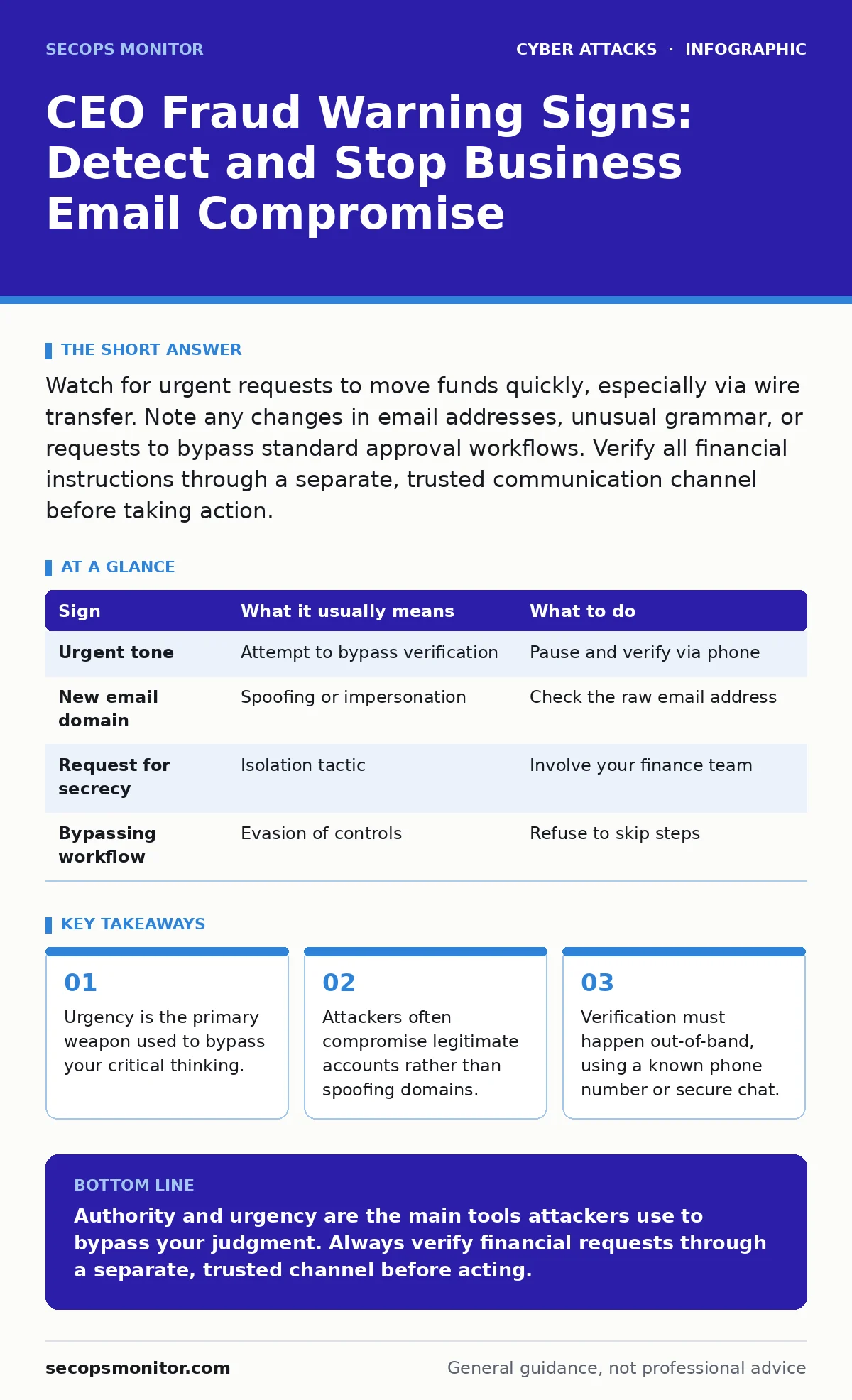
| Sign | What it usually means | What to do |
|---|---|---|
| Urgent tone | Attempt to bypass verification | Pause and verify via phone |
| New email domain | Spoofing or impersonation | Check the raw email address |
| Request for secrecy | Isolation tactic | Involve your finance team |
| Bypassing workflow | Evasion of controls | Refuse to skip steps |
See also: Phishing Defined: Anatomy of the Attack and Risk Reduction
Handling the Compromised Account
If the email comes from a legitimate account, the situation is more dangerous. The attacker has valid credentials. This often happens because of poor cyber hygiene, such as reused passwords or lack of multi-factor authentication.
In this case, the content may be perfect. The grammar is correct. The tone matches the executive’s style. You cannot rely on writing style as a detection method. You must rely on process. Any request for funds, regardless of how well-written it is, requires secondary verification.
This is why account lockout policies and strong authentication matter. If an attacker guesses a password, they should be locked out. If they steal a password, they should be stopped by multi-factor authentication. These technical controls reduce the surface area for compromise.
Immediate Response Steps
If you suspect CEO fraud, stop all action immediately. Do not send money. Do not share sensitive data. Report the incident to your security team. They can investigate the source and block further attempts.
Document everything. Save the email headers and any related communications. This information helps your team trace the attack and improve defenses. If you have already sent money, contact your bank immediately to attempt a recall. Success is not guaranteed, but speed improves your chances.
Preventing Future Incidents
Prevention requires a combination of technology and culture. Implement strict payment verification policies. Require multiple approvals for large transfers. Train employees to recognize social engineering tactics.
Regular security awareness training helps staff identify these threats. It teaches them to question authority when it comes via digital channels. Combine this with technical controls like email filtering and multi-factor authentication. This layered approach makes it harder for attackers to succeed.
Remember, vishing and other social engineering attacks often accompany email fraud. Attackers may call you to confirm the email request. They will use the same urgency and authority tactics. Treat phone calls with the same skepticism as emails.
Key takeaways
- Urgency is the primary weapon used to bypass your critical thinking.
- Attackers often compromise legitimate accounts rather than spoofing domains.
- Verification must happen out-of-band, using a known phone number or secure chat.
Authority and urgency are the main tools attackers use to bypass your judgment. Always verify financial requests through a separate, trusted channel before acting.
Frequently asked questions
How can I tell if an email address is fake?
Hover over the sender’s name to reveal the actual email address. Look for subtle differences in the domain name, such as extra letters or different extensions.
What if my CEO confirms the request over the phone?
Ensure you are calling a number you trust, not one from the email. Ask for a specific detail about the request that only your CEO would know.
Can email filters stop CEO fraud?
Filters can catch obvious spoofing, but they often miss compromised accounts. Human verification is still necessary for financial requests.
What should I do if I already sent money?
Contact your bank immediately to request a recall. Report the incident to your security team and document all communications for investigation.
How this guide was produced: written by the SecOps Monitor editorial team with AI assistance, checked against the public references listed below, and reviewed when the facts change. See our editorial policy or report an error.