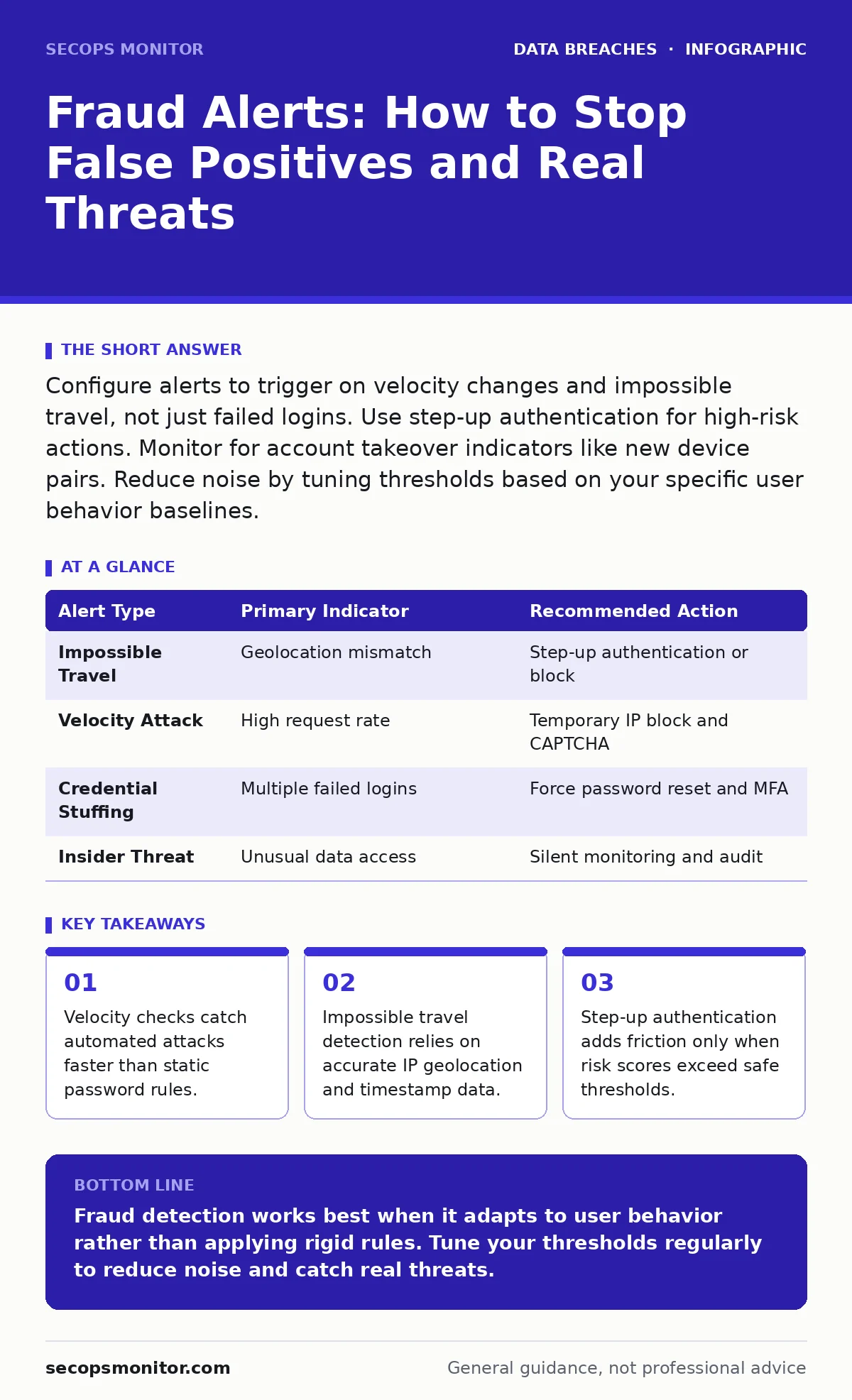
Configure alerts to trigger on velocity changes and impossible travel, not just failed logins. Use step-up authentication for high-risk actions. Monitor for account takeover indicators like new device pairs. Reduce noise by tuning thresholds based on your specific user behavior baselines.
What triggers a fraud alert system?
A fraud alert triggers when system behavior deviates from an established baseline of normal activity for a specific user or account. These deviations usually involve login attempts from unusual locations, rapid sequences of failed passwords, or changes to sensitive account settings. The system compares current actions against historical data to calculate a risk score. When that score crosses a predefined threshold, the alert fires.
Why do legitimate users get blocked by fraud detection?
Legitimate users get blocked because their behavior suddenly looks like an attack to the monitoring engine. This often happens when a user travels, uses a new device, or accesses the system from a public Wi-Fi network. The system sees a new IP address or device fingerprint and flags it as suspicious. This is known as a false positive, where the security measure prevents a real person from working.
How do you reduce false positives without lowering security?
You reduce false positives by implementing adaptive authentication, which adjusts requirements based on context rather than blocking everyone. Instead of a hard stop, the system can ask for additional verification only when the risk score is moderate. You must also regularly review and update the baseline of "normal" behavior for your user population. This ensures that common changes, like a new office location, do not trigger unnecessary alerts.
What is impossible travel detection and how does it work?
Impossible travel detection flags logins that occur in two distant geographic locations within a timeframe that makes physical travel impossible. For example, if a user logs in from New York and then from London ten minutes later, the system flags this as likely account takeover. The mechanism relies on accurate IP geolocation data and precise server timestamps. It assumes that a single human cannot be in two places at once.
How does velocity detection stop automated attacks?
Velocity detection monitors the speed and frequency of actions to identify bot-like behavior. Humans type at a certain rate and pause between actions, while scripts execute commands instantly and in rapid succession. If an account attempts ten password guesses in one second, the system blocks it immediately. This method catches brute-force attacks and credential stuffing before they succeed. It does not, however, stop slow, manual attacks by a determined human.
See also: Compliance Audits: What Auditors Actually Check and How to Pass
When should you use step-up authentication?
You should use step-up authentication when a user attempts a high-risk action, such as changing a password or downloading large datasets. This method keeps the login process smooth for low-risk activities but adds a second factor for sensitive operations. It balances security with user experience by avoiding constant friction. The system evaluates the risk of the specific action, not just the login event.
How do you handle alerts for compromised credentials?
When credentials are confirmed compromised, you must immediately revoke access and force a password reset. Do not simply block the IP address, as attackers often rotate through many sources. You should also check for lateral movement within your network from the compromised account. Reviewing the incident communication plans ensures that stakeholders are notified appropriately without causing panic. This process helps contain the damage before the attacker reaches critical data.
| Alert Type | Primary Indicator | Recommended Action |
|---|---|---|
| Impossible Travel | Geolocation mismatch | Step-up authentication or block |
| Velocity Attack | High request rate | Temporary IP block and CAPTCHA |
| Credential Stuffing | Multiple failed logins | Force password reset and MFA |
| Insider Threat | Unusual data access | Silent monitoring and audit |
What is silent monitoring and when should you use it?
Silent monitoring allows you to track suspicious activity without alerting the user or blocking their access. This is useful when you suspect an insider threat or a sophisticated attacker who might destroy evidence if blocked. You log all their actions and gather forensic data while they continue their routine. This approach preserves the chain of custody for digital evidence. It requires careful legal and policy review to ensure you are not violating privacy expectations.
How does device reputation affect fraud scoring?
Device reputation scores assess the trustworthiness of the hardware used to access your systems. A device with known malware, outdated operating systems, or a history of suspicious activity receives a lower trust score. The fraud system uses this score to adjust the authentication requirements. A new, clean device might get a higher threshold for blocking than a known, compromised one. This helps protect against attacks using infected endpoints.
How do you integrate fraud alerts with other security tools?
You integrate fraud alerts by feeding risk scores into your identity and access management systems. This allows for automated responses, such as blocking access or requiring multi-factor authentication. You should also correlate fraud alerts with data loss prevention tools to catch exfiltration attempts. This holistic view helps you understand the full scope of an attack. Refer to guides on role-based access control to ensure that automated blocks do not disrupt critical business functions.
What are the limitations of behavioral biometrics?
Behavioral biometrics analyze how a user interacts with a device, such as typing rhythm or mouse movements. While useful, these signals can be noisy and affected by factors like fatigue or hardware changes. They are not a standalone security control but rather a supplementary signal. You must combine them with other factors to avoid false positives. Relying on biometrics alone can lock out users who are simply tired or using a different keyboard.
Key takeaways
- Velocity checks catch automated attacks faster than static password rules.
- Impossible travel detection relies on accurate IP geolocation and timestamp data.
- Step-up authentication adds friction only when risk scores exceed safe thresholds.
- Silent monitoring allows you to gather intelligence without alerting the attacker.
Fraud detection works best when it adapts to user behavior rather than applying rigid rules. Tune your thresholds regularly to reduce noise and catch real threats.
Frequently asked questions
Can fraud alerts detect insider threats?
Yes, by monitoring for unusual access patterns, such as downloading large files at odd hours or accessing data outside a user's normal role.
How long should fraud alert logs be retained?
Retain logs long enough to support forensic investigations and meet **compliance audits** requirements, often several years depending on regulatory needs.
Do fraud alerts work for mobile apps?
Yes, they monitor device integrity, location, and behavior patterns within the app, similar to web-based systems.
What if a user loses their secondary authentication device?
Have a secure backup method, such as backup codes or a secondary trusted device, to prevent being locked out during a **lost and stolen devices** scenario.
How this guide was produced: written by the SecOps Monitor editorial team with AI assistance, checked against the public references listed below, and reviewed when the facts change. See our editorial policy or report an error.