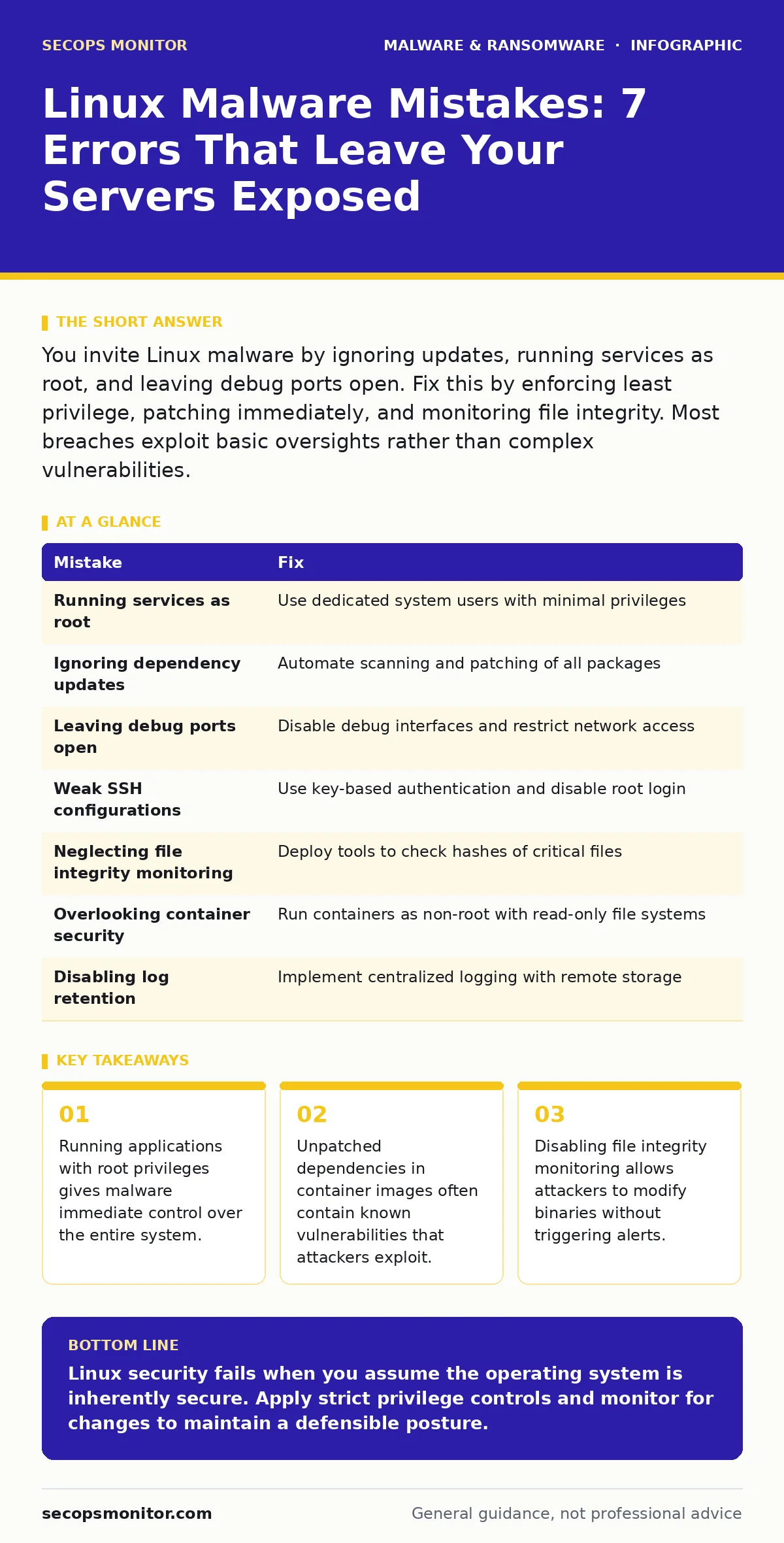
You invite Linux malware by ignoring updates, running services as root, and leaving debug ports open. Fix this by enforcing least privilege, patching immediately, and monitoring file integrity. Most breaches exploit basic oversights rather than complex vulnerabilities.
Mistake 1: Running Services as Root
Running daemons with root privileges is the single biggest risk factor for Linux systems. When a service runs as root, any vulnerability in that service grants the attacker full administrative control. This bypasses all user-level protections and allows immediate access to sensitive files.
Why it hurts:
A compromised web server running as root allows an attacker to read shadow files, install backdoors, and pivot to other systems. The privilege escalation is instantaneous and silent. You lose the ability to contain the breach within a specific user context.
The fix:
Create dedicated system users for each service with minimal permissions. Use capabilities to grant only the specific rights the service needs, such as binding to low ports. Never run application code with root credentials unless absolutely necessary for kernel-level operations.
Mistake 2: Ignoring Dependency Updates
Many administrators update the operating system kernel but neglect third-party libraries and dependencies. Attackers target known vulnerabilities in widely used libraries like OpenSSL or Log4j. These components often run with the same privileges as the main application.
Why it hurts:
An outdated library can execute arbitrary code when the application processes specific inputs. This allows attackers to bypass application-level security controls. The attack surface expands with every unpatched dependency you leave behind.
The fix:
Automate dependency scanning and patching. Use tools that check for vulnerabilities in all installed packages, not just the base OS. Apply updates promptly and test them in a staging environment before production deployment.
Mistake 3: Leaving Debug Ports Open
Developers often leave debug interfaces, such as JMX or SSH, exposed to the network for convenience. These ports provide direct access to system internals and configuration data. Attackers scan for these open ports to find low-hanging fruit.
Why it hurts:
Open debug ports allow remote code execution without authentication. Attackers can modify configurations, restart services, or inject malicious code. This creates a direct pathway into your infrastructure that bypasses standard firewalls.
The fix:
Disable all debug interfaces in production environments. Restrict access to management ports using firewall rules and IP whitelisting. Monitor network traffic for connections to these ports and alert on any unauthorized access attempts.
Mistake 4: Using Weak SSH Configurations
Default SSH settings often permit password authentication and root login. Attackers use brute-force attacks to guess weak passwords. Even strong passwords can be compromised through credential stuffing or phishing campaigns.
Why it hurts:
Password-based authentication is vulnerable to automated attacks. Allowing root login via SSH gives attackers immediate administrative access if they guess the password. This eliminates the audit trail of user actions.
The fix:
Disable password authentication and use SSH key pairs only. Disable root login via SSH entirely. Use a jump host or bastion server to manage access to internal systems. Implement multi-factor authentication for an additional layer of security.
Mistake 5: Neglecting File Integrity Monitoring
Without file integrity monitoring, you cannot detect when system binaries are modified. Attackers often replace legitimate binaries with malicious versions to maintain persistence. This technique is known as rootkit installation.
Why it hurts:
Modified binaries can hide processes, network connections, and files from standard tools. You lose visibility into the system state. The attacker can operate undetected for months, exfiltrating data or preparing for ransomware deployment.
The fix:
Deploy file integrity monitoring tools that check critical system files against known good hashes. Alert on any unauthorized changes to binaries, configuration files, and scripts. Regularly review logs to identify patterns of suspicious activity.
See also: What Is the Difference Between Firmware and Malware
Mistake 6: Overlooking Container Security
Containers are often treated as isolated environments, but they share the host kernel. Misconfigured containers can escape isolation and access the host system. Attackers exploit this to gain broader access to the infrastructure.
Why it hurts:
A compromised container can read host files, modify other containers, and install malware on the host. This breaks the principle of least privilege. The attack surface expands from a single application to the entire server.
The fix:
Run containers with non-root users and read-only file systems. Limit resource usage and network access for each container. Scan container images for vulnerabilities before deployment. Use security profiles to restrict capabilities.
Mistake 7: Disabling Log Retention
Many administrators disable log retention to save disk space. Logs provide the only record of system activity and security events. Without logs, you cannot investigate incidents or detect anomalies.
Why it hurts:
Deleted logs erase the evidence of an attack. You cannot determine the scope of the breach or the methods used. This hinders incident response and forensic analysis. Attackers often delete logs to cover their tracks.
The fix:
Implement centralized logging with remote storage. Retain logs for an extended period, such as 90 days or more. Protect log files from modification and deletion. Regularly review logs for signs of compromise.
| Mistake | Fix |
|---|---|
| Running services as root | Use dedicated system users with minimal privileges |
| Ignoring dependency updates | Automate scanning and patching of all packages |
| Leaving debug ports open | Disable debug interfaces and restrict network access |
| Weak SSH configurations | Use key-based authentication and disable root login |
| Neglecting file integrity monitoring | Deploy tools to check hashes of critical files |
| Overlooking container security | Run containers as non-root with read-only file systems |
| Disabling log retention | Implement centralized logging with remote storage |
Key takeaways
- Running applications with root privileges gives malware immediate control over the entire system.
- Unpatched dependencies in container images often contain known vulnerabilities that attackers exploit.
- Disabling file integrity monitoring allows attackers to modify binaries without triggering alerts.
Linux security fails when you assume the operating system is inherently secure. Apply strict privilege controls and monitor for changes to maintain a defensible posture.
Frequently asked questions
Can Linux malware spread like Windows viruses?
Linux malware typically requires user interaction or exploitation of vulnerabilities. It does not self-propagate through file shares as commonly as Windows viruses, but it can spread via network services.
How do I detect a Linux rootkit?
Use file integrity monitoring and behavioral analysis tools. Compare system binaries against known good hashes. Look for hidden processes and network connections that do not match expected behavior.
Are containers safe from malware?
Containers provide isolation but share the host kernel. Misconfigurations can allow escape. Scan images, run as non-root, and limit capabilities to reduce risk.
Should I use signature-based detection for Linux?
Signature-based detection identifies known malware but misses new threats. Combine it with behavioral analysis and anomaly detection for broader coverage.
How this guide was produced: written by the SecOps Monitor editorial team with AI assistance, checked against the public references listed below, and reviewed when the facts change. See our editorial policy or report an error.