Stop Linux malware by enforcing least privilege, disabling unused services, and verifying package signatures. Perimeter firewalls fail against insider threats. You must restrict process capabilities and validate every binary before execution to stop execution chains.
The Myth of Linux Immunity
Imagine assuming your server is safe because it runs a non-Windows operating system. This belief creates a blind spot. Attackers target Linux because it hosts critical infrastructure, containers, and cloud workloads. The complexity of the environment often masks early indicators of compromise.
You must treat Linux with the same suspicion as any other platform. The attack surface is different, but the goal remains the same: unauthorized control. Relying on obscurity leaves you vulnerable to automated scanning tools that find default credentials and unpatched vulnerabilities.
Enforce Least Privilege First
The single most effective control is limiting what users and processes can do. Create separate accounts for each service and application. Do not run web servers or databases as root. Root access allows a compromised process to modify system files, install keyloggers, or disable security controls.
Use sudo with specific command allowances instead of granting full administrative rights. This restricts the damage if an attacker steals a user credential. You should also disable password authentication for SSH, forcing the use of public keys. This prevents brute-force attacks that guess weak passwords.
Validate Every Package Source
Supply chain attacks inject malicious code into legitimate software updates. You must verify the integrity of every package before installation. Use package managers that support cryptographic signatures, such as apt with GPG keys or dnf with RPM signing. Never disable signature verification for convenience.
If a package fails verification, do not force the installation. Investigate the source. A failed signature check often indicates a man-in-the-middle attack or a compromised repository mirror. This step stops wiper malware and other destructive payloads from entering your system through trusted channels.
Disable Unused Services and Ports
Every running service is a potential entry point. Audit your system for services you do not actively use. Disable anything that is not required for the system's primary function. This includes legacy protocols like FTP or Telnet, which transmit data in plain text.
Close ports that do not serve a business purpose. Use a host-based firewall to deny all incoming traffic by default, then allow only specific ports. This reduces the noise for your intrusion detection systems. It also prevents attackers from exploiting vulnerabilities in software you forgot was installed.
Implement Application Whitelisting
Traditional antivirus relies on signature-based detection, which fails against new or modified malware. Whitelisting is more effective. It allows only approved applications to run. Any binary not on the list is blocked from execution.
This approach stops zero-day exploits and fileless malware. It requires more initial setup, as you must catalog all legitimate binaries. However, it provides a strong barrier against unknown threats. Tools like AppArmor or SELinux can enforce these policies by restricting file access and network connections for specific processes.
See also: What Is the Difference Between Firmware and Malware
Monitor for Anomalous Behavior
Static controls are not enough. You need to detect activity that deviates from the norm. Monitor for processes spawning from unexpected locations. Look for high CPU usage during off-hours, which may indicate cryptojacking.
Check for new users or groups added to the system. Watch for outbound connections to unknown IP addresses. These behaviors often signal that an attacker has established persistence. Log everything and centralize the logs. This makes it easier to spot patterns across multiple systems.
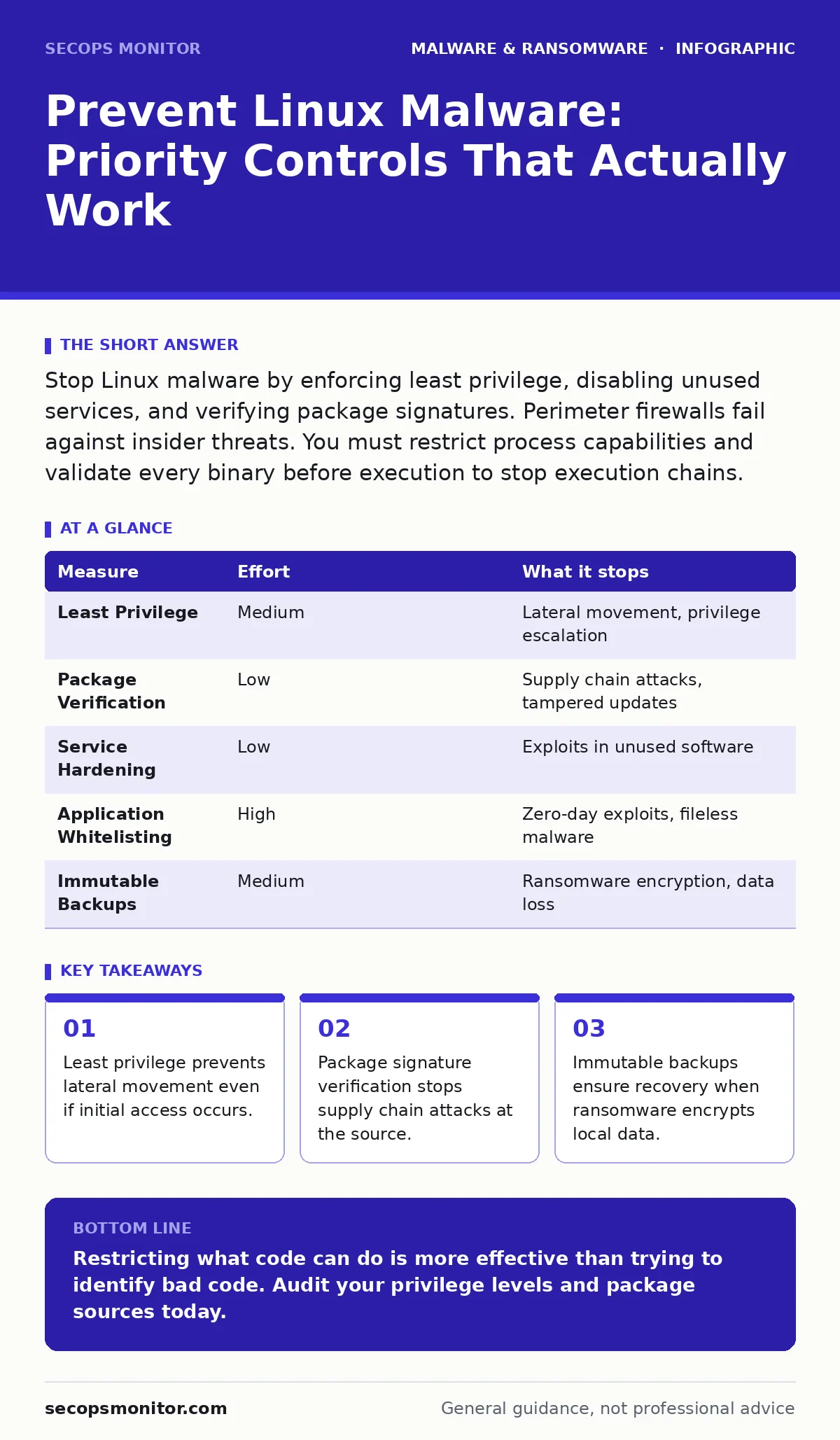
| Measure | Effort | What it stops |
|---|---|---|
| Least Privilege | Medium | Lateral movement, privilege escalation |
| Package Verification | Low | Supply chain attacks, tampered updates |
| Service Hardening | Low | Exploits in unused software |
| Application Whitelisting | High | Zero-day exploits, fileless malware |
| Immutable Backups | Medium | Ransomware encryption, data loss |
Secure the Boot Process
Bootkits load before the operating system starts. They reside in the firmware or the boot loader. If your system is compromised at this level, software-based tools cannot detect or remove the threat.
Use Secure Boot to ensure only signed bootloaders and kernels load. This prevents unauthorized code from executing during startup. Regularly update your firmware to patch known vulnerabilities. This protects against persistent threats that survive reimaging infected computers.
Maintain Immutable Backups
Ransomware encrypts your data and demands payment. If your backups are writable, the malware can encrypt them too. Immutable backups are read-only for a set period. This ensures that even if an attacker gains full control, they cannot delete or modify your recovery data.
Test your backups regularly. A backup that cannot be restored is useless. Store copies offsite or in a separate network segment. This prevents a single breach from destroying all your data.
Quick Wins for Today
Start with these three actions. They provide immediate risk reduction with minimal effort.
- Disable password authentication for SSH on all servers.
- Verify that package signing is enabled for your OS repository.
- Audit running services and disable any that are not essential.
These steps close common entry points. They do not require new software or complex configurations. You can implement them in hours, not days.
Key takeaways
- Least privilege prevents lateral movement even if initial access occurs.
- Package signature verification stops supply chain attacks at the source.
- Immutable backups ensure recovery when ransomware encrypts local data.
Restricting what code can do is more effective than trying to identify bad code. Audit your privilege levels and package sources today.
Frequently asked questions
Does Linux need antivirus software?
Traditional antivirus is less effective on Linux. Focus on host-based intrusion prevention, whitelisting, and behavioral monitoring instead.
How do I detect if my Linux server is compromised?
Look for unexpected network connections, new user accounts, and processes running from unusual directories. Compare current states against known baselines.
Can ransomware encrypt Linux file systems?
Yes. Ransomware targets ext4, XFS, and other Linux file systems. Immutable backups are the only reliable defense against data loss.
Is disabling root login enough?
No. Disabling direct root login is good, but attackers can escalate privileges via vulnerable services. Enforce least privilege for all accounts.
How this guide was produced: written by the SecOps Monitor editorial team with AI assistance, checked against the public references listed below, and reviewed when the facts change. See our editorial policy or report an error.