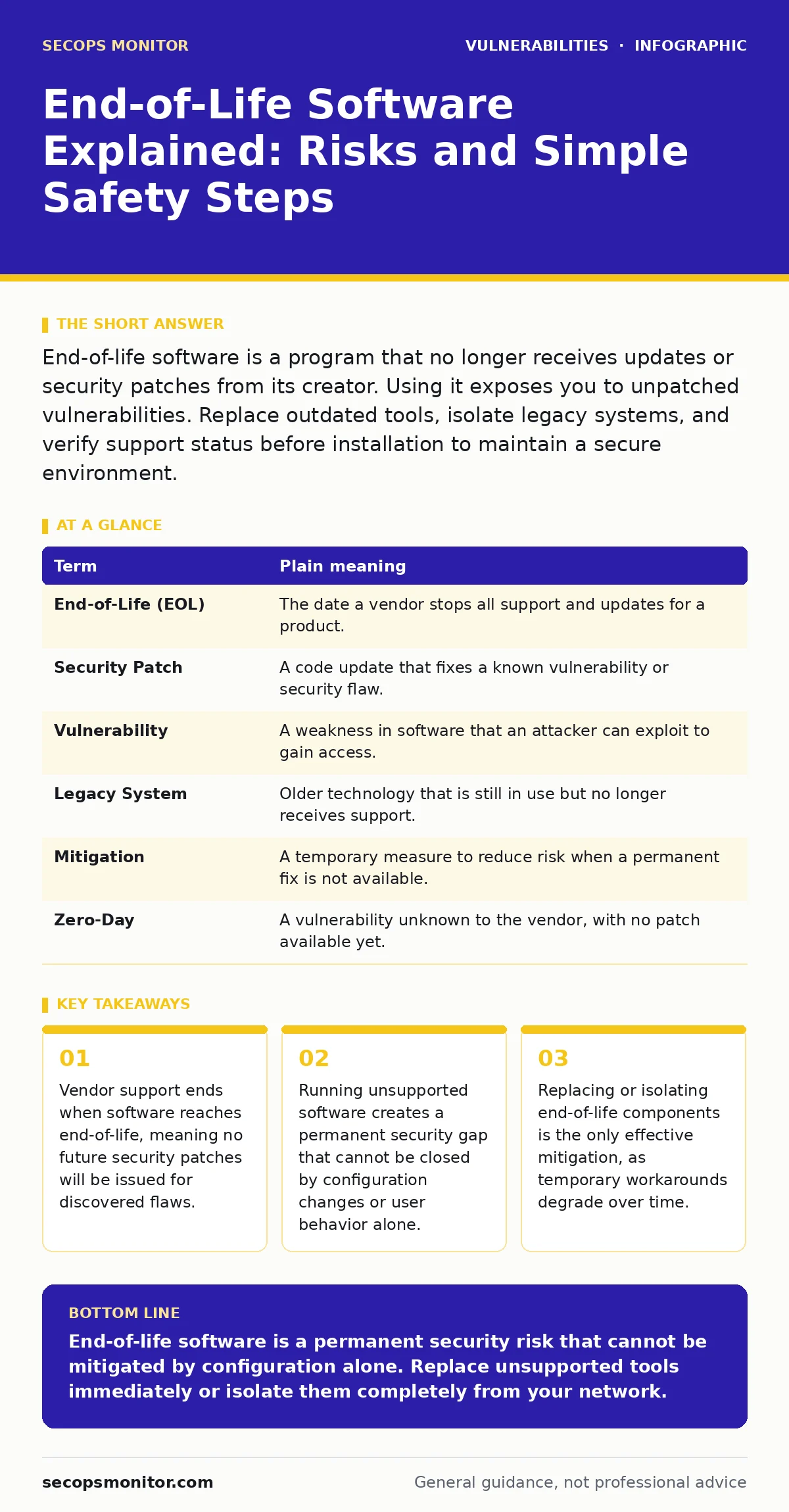
End-of-life software is a program that no longer receives updates or security patches from its creator. Using it exposes you to unpatched vulnerabilities. Replace outdated tools, isolate legacy systems, and verify support status before installation to maintain a secure environment.
The Abandoned House Analogy
Imagine you buy a house with a solid lock on the front door. The lock manufacturer promises to send new keys and repair kits whenever thieves find a way to pick the existing lock. This promise represents active software support. You feel safe because the vendor fixes weaknesses as they appear.
Suppose the manufacturer goes out of business. They stop sending repair kits. The lock still works, but if thieves find a new trick to bypass it, no one will provide a fix. Your house is now vulnerable to any new method discovered by criminals. This is exactly what happens when software reaches end-of-life.
Defining End-of-Life Software
End-of-life, often abbreviated as EOL, is the point when a vendor stops providing any support for a specific product. This includes security patches, bug fixes, and technical assistance. The software may still function, but it is frozen in time. Any security hole discovered after this date remains open forever.
This is different from a product simply becoming old. Old software can still receive updates if the vendor supports it. End-of-life means the vendor has explicitly decided to stop caring about that specific version. You are left holding a tool that the creator no longer trusts.
| Term | Plain meaning |
|---|---|
| End-of-Life (EOL) | The date a vendor stops all support and updates for a product. |
| Security Patch | A code update that fixes a known vulnerability or security flaw. |
| Vulnerability | A weakness in software that an attacker can exploit to gain access. |
| Legacy System | Older technology that is still in use but no longer receives support. |
| Mitigation | A temporary measure to reduce risk when a permanent fix is not available. |
| Zero-Day | A vulnerability unknown to the vendor, with no patch available yet. |
Why Ordinary Users Are at Risk
You might think end-of-life only matters for large companies. This is a dangerous assumption. Your home router, smart thermostat, or old laptop likely runs software that has reached end-of-life. Attackers scan the internet for these known weaknesses. They do not need to invent new tricks; they use public lists of unpatched flaws.
When your device connects to the network, it announces its identity to the world. If that identity matches a known end-of-life product, automated bots will attempt to exploit it. You do not need to be a target. You just need to be online. The risk is not theoretical; it is constant and passive.
The Hidden Cost of Compatibility
Many users keep end-of-life software because modern alternatives do not support their specific workflow. A specialized accounting tool from a decade ago might still run perfectly. Replacing it requires buying new software, migrating data, and retraining staff. This friction is the hidden cost of security.
This trade-off often leads to dangerous compromises. Users might disable security features to make old software work. They might run the old program in a browser that is also outdated. Each compromise multiplies the risk. The convenience of familiar tools often outweighs the abstract fear of a breach, until the breach happens.
Simple Safety Habits for Maintenance
You can reduce risk without throwing away every old device. The first step is inventory. List every device and software version you use. Check the vendor's website for the support status of each item. If a product is end-of-life, mark it for replacement or isolation.
The second step is isolation. If you must keep an end-of-life device, disconnect it from your main network. Use a separate guest network or keep it offline entirely. This prevents attackers from using it as a bridge to your sensitive data. Isolation does not fix the vulnerability, but it limits the damage.
The third step is verification. Never install software from unofficial sources hoping for a patch. Third-party fixes are often malware in disguise. Stick to official vendor channels. If the vendor is gone, assume the software is unsafe for any network-connected task.
- Audit your devices and note the version and vendor support status.
- Isolate any end-of-life devices from your primary network connection.
- Replace unsupported software with actively maintained alternatives.
See also: Why Vulnerability Severity Ratings Dictate Your Patching Priority
Understanding Related Security Practices
Managing end-of-life software is part of a broader security strategy. You should look into emergency patching procedures for when critical flaws are discovered in supported software. Understanding vulnerability severity ratings helps you prioritize which updates to apply first.
For network devices, router vulnerabilities are a common entry point for attackers. Ensure your network hardware is not end-of-life. Dependency updates are also critical, as modern applications rely on many smaller libraries that may reach end-of-life independently.
Consider threat modeling to identify where end-of-life components create the highest risk in your environment. This proactive approach is better than reacting after a breach. While memory-safe programming languages help prevent new vulnerabilities, they do not fix existing flaws in older code.
Dynamic application security testing (DAST) can help identify weaknesses in supported applications, but it cannot validate the security of unsupported ones. Patch Tuesday is a regular update cycle for many vendors; staying current during these cycles prevents future end-of-life scenarios.
The Reality of Permanent Exposure
There is no way to fully secure end-of-life software. You can wrap it in firewalls and monitor it closely, but the code itself remains flawed. Attackers have infinite patience and access to public exploit code. Your defenses will eventually degrade or be bypassed.
The only true fix is replacement. Plan for migration early. Do not wait until the software breaks or a breach occurs. Budget for upgrades as a regular operating expense, not an emergency cost. Security is a continuous process of retiring old weaknesses and maintaining new ones.
Key takeaways
- Vendor support ends when software reaches end-of-life, meaning no future security patches will be issued for discovered flaws.
- Running unsupported software creates a permanent security gap that cannot be closed by configuration changes or user behavior alone.
- Replacing or isolating end-of-life components is the only effective mitigation, as temporary workarounds degrade over time.
End-of-life software is a permanent security risk that cannot be mitigated by configuration alone. Replace unsupported tools immediately or isolate them completely from your network.
Frequently asked questions
Can I use end-of-life software if I never connect it to the internet?
Yes, offline use significantly reduces risk, but you must ensure no data ever moves between the offline device and your connected network.
How do I know if my software is end-of-life?
Check the vendor's official website for support lifecycle policies. Look for dates indicating when security updates will cease for your specific version.
Is antivirus enough to protect outdated software?
No, antivirus detects known malware but cannot fix the underlying code vulnerabilities that allow attackers to bypass security controls entirely.
What if the vendor no longer exists?
Treat the software as inherently unsafe for any network-connected task. Isolate it or replace it with a supported alternative from a different vendor.
How this guide was produced: written by the SecOps Monitor editorial team with AI assistance, checked against the public references listed below, and reviewed when the facts change. See our editorial policy or report an error.