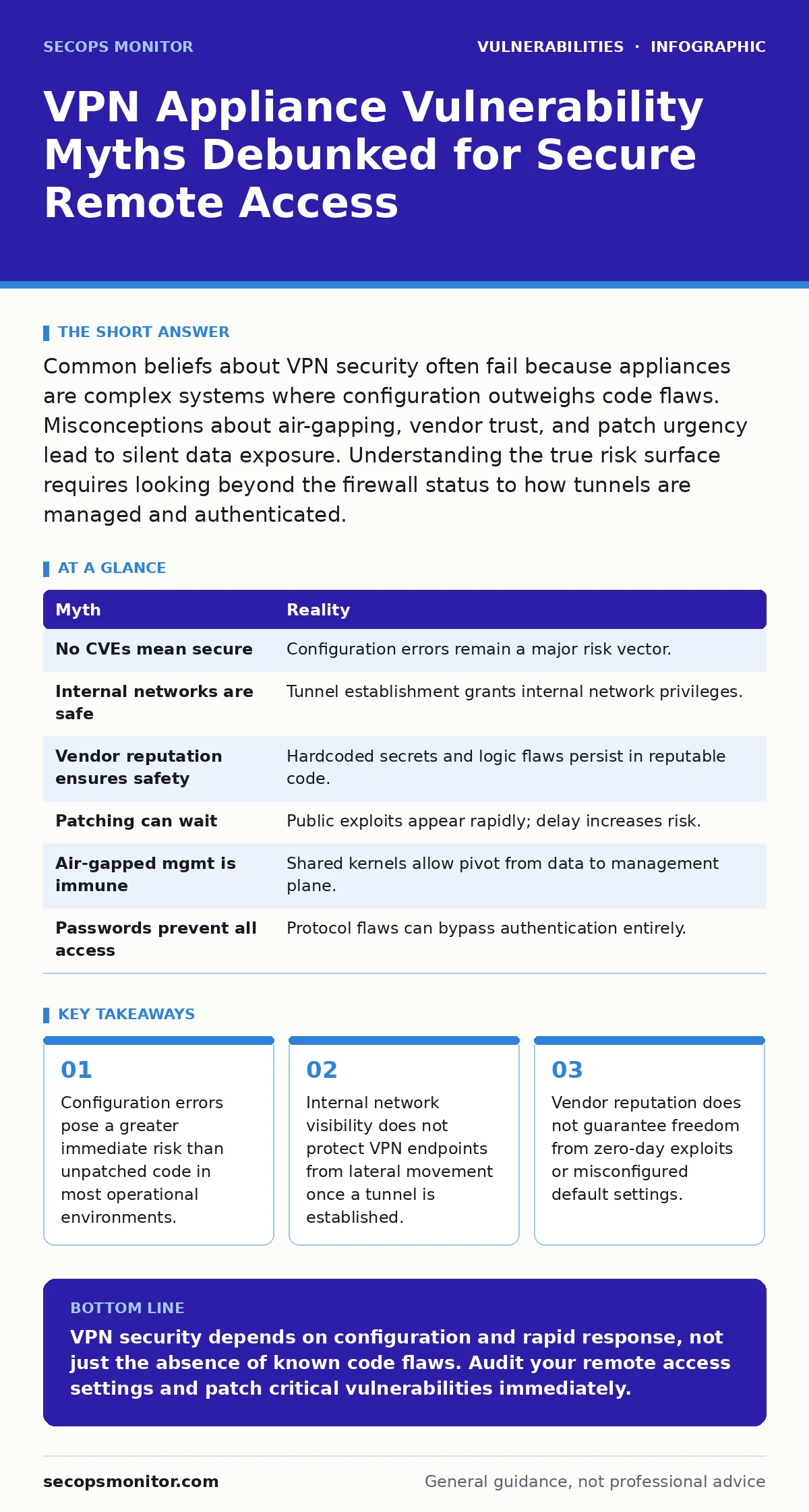
Common beliefs about VPN security often fail because appliances are complex systems where configuration outweighs code flaws. Misconceptions about air-gapping, vendor trust, and patch urgency lead to silent data exposure. Understanding the true risk surface requires looking beyond the firewall status to how tunnels are managed and authenticated.
Myth: The VPN appliance is secure if it has no known CVEs
Reality: A clean vulnerability scan result does not guarantee operational security. Common vulnerability enumerations track code flaws, not configuration mistakes. An appliance can have every security patch installed yet still allow unauthorized access through weak authentication policies or overly permissive tunnel rules. The absence of a known exploit ID means only that no public researcher has published a proof of concept for a specific code defect. It says nothing about how you have configured the device.
Security misconfigurations remain the leading cause of remote access breaches. You might correctly patch the operating system kernel, but if you leave default administrative accounts active or permit weak encryption protocols, the device fails. An attacker does not need to exploit a buffer overflow if the login page accepts common passwords or if the split-tunneling feature exposes internal subnets to untrusted devices.
Myth: Internal networks are safe from VPN breaches
Reality: A successful VPN connection grants the attacker the same privileges as a legitimate remote user. Many organizations assume that because the breach originates externally, the internal network remains isolated. This logic fails immediately upon tunnel establishment. The VPN gateway decrypts traffic and injects it into the local network segment. From that point, the traffic is indistinguishable from normal internal communication.
The compromise often shifts from perimeter defense to lateral movement. If the compromised endpoint has visibility into sensitive databases or domain controllers, the breach expands rapidly. Segmentation strategies must treat VPN traffic as potentially hostile until verified. Assume that any device connected via virtual private network could be malicious. This mindset drives the implementation of micro-segmentation and least-privilege access controls for remote sessions.
Myth: Vendor reputation ensures code safety
Reality: Trusted vendors still ship products with hardcoded secrets in source code or logic flaws that bypass authentication. Brand loyalty creates a false sense of security. Large organizations with dedicated security teams still release updates that contain critical defects. These flaws often stem from complex legacy codebases or rushed development cycles. The vendor’s size does not prevent a developer from embedding debug credentials or leaving a backdoor for maintenance access.
You must verify the integrity of the software independently. Relying on the vendor’s word is insufficient for high-security environments. Third-party audits and binary analysis provide additional assurance. Even reputable manufacturers can suffer from supply chain compromises or insider threats. Treating vendor claims as absolute truth leaves you vulnerable to exploits that the vendor may not have discovered or disclosed promptly.
Myth: Patching can wait until business hours
Reality: Critical vulnerabilities in remote access infrastructure often receive public exploits within days of disclosure. Delaying updates to avoid operational disruption increases the window of exposure significantly. Emergency patching procedures exist precisely because remote access appliances are high-value targets. Attackers automate the search for unpatched devices. Waiting for a scheduled maintenance window can result in successful intrusion before the patch is applied.
The trade-off involves balancing system availability with security risk. Downtime is costly, but data breach remediation is far more expensive and disruptive. Implement automated testing in a staging environment to validate patches before production deployment. This reduces the risk of breaking connectivity while allowing faster response times. You cannot predict which vulnerability will be weaponized next. Speed of remediation is a primary defense.
Myth: Air-gapped management interfaces are immune
Reality: Management interfaces often share the same kernel or privilege space as the data plane. Isolating the administrative port from the public internet does not prevent attacks originating from the internal network or compromised admin stations. Many appliances allow management traffic to traverse the same hardware components as user data. A privilege escalation exploit in the management console can grant control over the entire device, including the routing tables.
Physical or network isolation provides limited protection against sophisticated adversaries. If an attacker gains access to any part of the system, they may pivot to the management interface. Secure management requires multi-factor authentication and strict access controls regardless of network location. Assume that the management channel is as vulnerable as the user data channel. Isolate it logically, but do not assume it is inherently secure due to its restricted connectivity.
See also: End-of-Life Software Explained: Risks and Simple Safety Steps
Myth: Complex passwords prevent all unauthorized access
Reality: Authentication bypasses often occur through protocol flaws rather than credential guessing. Strong passwords do not protect against vulnerabilities that skip the authentication step entirely. Some VPN implementations have flaws in how they handle certificate validation or session tokens. An attacker can manipulate these parameters to gain access without knowing any user credentials. This renders password complexity irrelevant in specific exploit scenarios.
Multi-factor authentication adds a layer of defense, but it is not a silver bullet. If the underlying protocol has a flaw that allows session hijacking or token forgery, the second factor may be circumvented. Regularly review the cryptographic protocols supported by your appliance. Disable outdated standards that are known to be vulnerable to downgrade attacks. Authentication strength is only one component of a secure remote access architecture.
| Myth | Reality |
|---|---|
| No CVEs mean secure | Configuration errors remain a major risk vector. |
| Internal networks are safe | Tunnel establishment grants internal network privileges. |
| Vendor reputation ensures safety | Hardcoded secrets and logic flaws persist in reputable code. |
| Patching can wait | Public exploits appear rapidly; delay increases risk. |
| Air-gapped mgmt is immune | Shared kernels allow pivot from data to management plane. |
| Passwords prevent all access | Protocol flaws can bypass authentication entirely. |
Key takeaways
- Configuration errors pose a greater immediate risk than unpatched code in most operational environments.
- Internal network visibility does not protect VPN endpoints from lateral movement once a tunnel is established.
- Vendor reputation does not guarantee freedom from zero-day exploits or misconfigured default settings.
VPN security depends on configuration and rapid response, not just the absence of known code flaws. Audit your remote access settings and patch critical vulnerabilities immediately.
Frequently asked questions
How do I check for VPN misconfigurations?
Use automated configuration auditing tools that compare your settings against industry best practices and vendor hardening guides.
What is the biggest risk in VPN appliances?
Misconfigured access controls and weak authentication protocols often pose a greater immediate threat than unpatched code vulnerabilities.
Should I disable all VPN features not in use?
Yes, disabling unused features reduces the attack surface and minimizes the potential impact of any undiscovered vulnerabilities.
How often should I review VPN logs?
Monitor logs continuously for anomalies, but conduct detailed forensic reviews after any suspected breach or unusual traffic pattern.
How this guide was produced: written by the SecOps Monitor editorial team with AI assistance, checked against the public references listed below, and reviewed when the facts change. See our editorial policy or report an error.