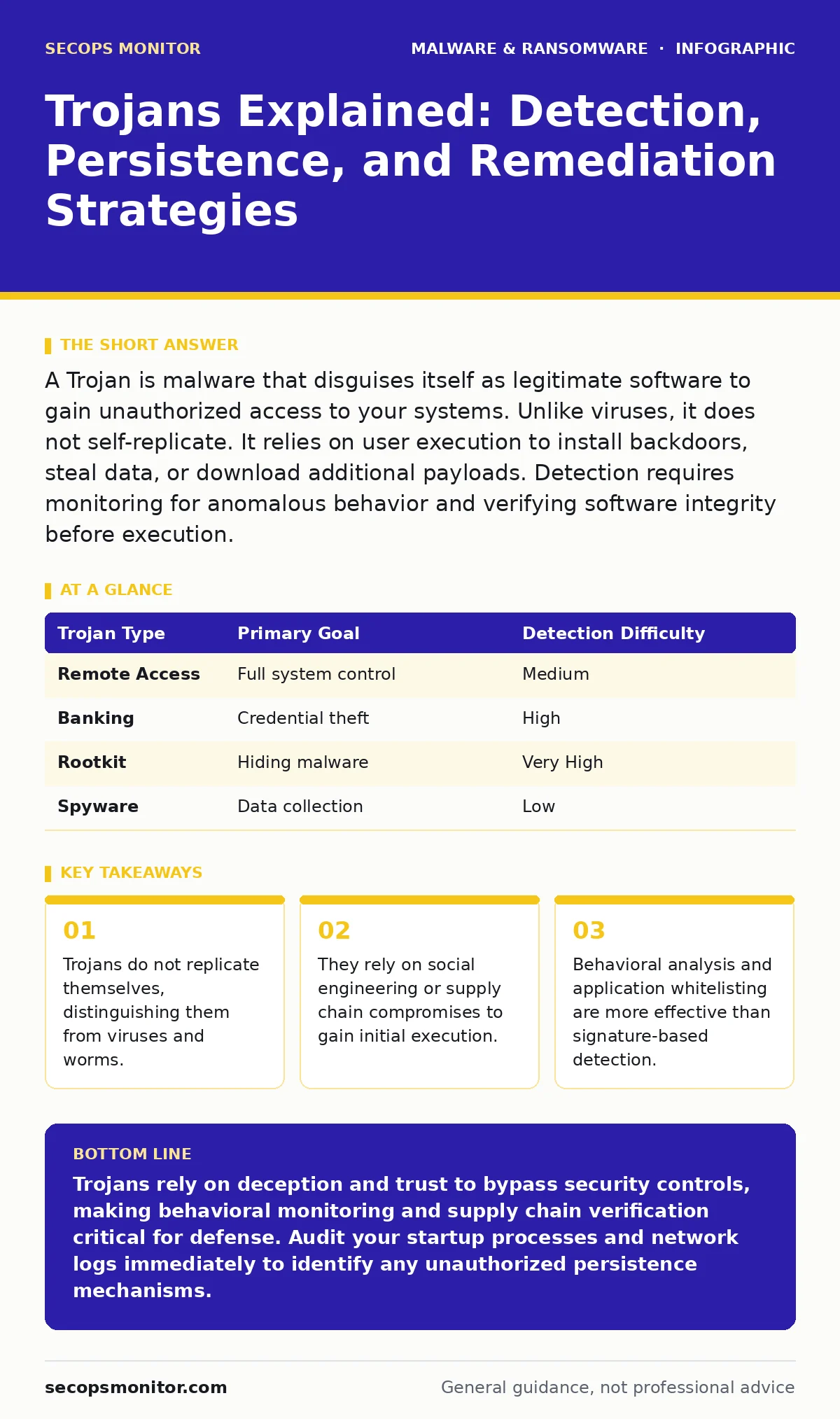
A Trojan is malware that disguises itself as legitimate software to gain unauthorized access to your systems. Unlike viruses, it does not self-replicate. It relies on user execution to install backdoors, steal data, or download additional payloads. Detection requires monitoring for anomalous behavior and verifying software integrity before execution.
What is a Trojan and how does it differ from a virus?
A Trojan is a type of malware that masquerades as legitimate software to trick users into executing it. Unlike a virus, a Trojan does not self-replicate or infect other files automatically. It requires a user to actively run the infected program. This distinction matters because prevention strategies differ significantly. Viruses spread through file sharing and network propagation, while Trojans spread through deception and trust. You must verify the source of every executable before running it.
How do Trojans gain initial access to a system?
Trojans typically enter systems through social engineering or compromised supply chains. Users may download what appears to be a legitimate utility, game crack, or software update. The attacker bundles the malicious code with the benign application. In supply chain attacks, the attacker compromises the developer’s build environment. The resulting software is signed with valid certificates but contains hidden payloads. This makes static analysis difficult because the file appears authentic. You must assume any downloaded executable could contain hidden code.
What are the common types of Trojans and their payloads?
Trojans deliver various payloads depending on the attacker’s goal. Remote Access Trojans provide full control of the infected machine. Banking Trojans steal credentials by overlaying fake login windows. Rootkits hide the presence of the malware from the operating system. Spyware records keystrokes and captures screenshots. Some Trojans deploy ransomware after establishing persistence. Others facilitate cryptojacking by using system resources to mine digital currency. Understanding the payload type helps you prioritize incident response efforts.
| Trojan Type | Primary Goal | Detection Difficulty |
|---|---|---|
| Remote Access | Full system control | Medium |
| Banking | Credential theft | High |
| Rootkit | Hiding malware | Very High |
| Spyware | Data collection | Low |
Why do traditional antivirus solutions often miss Trojans?
Traditional antivirus relies on signature matching against known malware databases. Trojans are frequently modified by attackers to change their digital fingerprint. This technique, known as polymorphism, alters the code without changing its function. New variants appear before signatures are updated. Zero-day Trojans have no known signatures at all. Signature-based detection fails against customized or obfuscated code. You need heuristic detection methods that analyze behavior rather than static file properties. Monitoring for unusual network connections and process injections is more effective.
How do Trojans maintain persistence on a compromised system?
Persistence mechanisms ensure the Trojan survives system reboots and updates. Attackers modify startup folders to launch the malware automatically. They may create scheduled tasks that run at specific intervals. Registry keys can be altered to execute the payload during user login. Some Trojans inject their code into legitimate system processes. This technique, called process hollowing, hides the malicious activity within trusted processes. Bootkits can infect the master boot record, loading before the operating system. Removing persistence requires checking all startup locations and validating process integrity.
What behavioral signs indicate a Trojan infection?
Trojans often leave subtle behavioral traces before causing major damage. Unexpected outbound network connections to unknown IP addresses are a primary indicator. High CPU or GPU usage without a corresponding application suggests cryptojacking or command-and-control communication. Legitimate applications may crash or behave erratically if the Trojan injects code into them. New user accounts may appear with administrative privileges. Firewall rules might change to allow inbound connections. Monitoring logs for these anomalies is critical. You should establish a baseline of normal network and system behavior to spot deviations.
How can you detect and remove a Trojan effectively?
Detection requires a multi-layered approach combining behavioral monitoring and integrity checks. Use endpoint detection and response tools to monitor process creation and network activity. Verify file hashes against known good values. Check for unexpected modifications to system files. Removal involves terminating malicious processes and deleting associated files. You must also remove persistence mechanisms like registry entries and scheduled tasks. In severe cases, reinstalling the operating system is the only way to ensure complete removal. Do not trust a system that has shown signs of a rootkit.
What is the risk of a Trojan in a supply chain attack?
Supply chain Trojans compromise trusted software vendors to distribute malware to many victims. The attacker injects malicious code into the update package. Users receive the update through legitimate channels. The software is often signed with valid certificates, bypassing code signing checks. This method bypasses perimeter defenses and user skepticism. The impact is widespread because the trust relationship is pre-established. Mitigation requires verifying update sources and monitoring for unexpected code changes. You should treat every update as potentially compromised until verified.
How do Trojans interact with other malware families?
Trojans often serve as delivery mechanisms for more destructive malware. They may download ransomware payloads after establishing a foothold. Some Trojans deploy wiper malware to destroy data before encryption. Others install bootkits to maintain deep system access. This modular approach allows attackers to update payloads remotely. The initial Trojan provides access, while subsequent modules perform the actual damage. Understanding this relationship helps you anticipate secondary infections. You must isolate affected systems immediately to prevent lateral movement.
What are the long-term implications of a Trojan breach?
A Trojan breach can compromise system integrity for extended periods. Attackers may use the access to harvest sensitive data over months. They can pivot to other systems within the network. The presence of a rootkit makes detection nearly impossible with standard tools. Recovery requires thorough forensic analysis to determine the scope. You must reset all credentials and revoke certificates issued during the compromise period. Rebuilding trust in the affected systems takes significant time and resources. Consider the recovery time objective when planning your incident response.
Key takeaways
- Trojans do not replicate themselves, distinguishing them from viruses and worms.
- They rely on social engineering or supply chain compromises to gain initial execution.
- Behavioral analysis and application whitelisting are more effective than signature-based detection.
Trojans rely on deception and trust to bypass security controls, making behavioral monitoring and supply chain verification critical for defense. Audit your startup processes and network logs immediately to identify any unauthorized persistence mechanisms.
Frequently asked questions
Can a Trojan spread automatically like a virus?
No, Trojans do not self-replicate. They require a user to execute the infected file or an administrator to deploy the compromised software.
Is removing a Trojan as simple as deleting the file?
Deleting the file is often insufficient. You must also remove persistence mechanisms, such as registry keys and scheduled tasks, to prevent re-execution.
Do Trojans only affect Windows systems?
Trojans target any operating system, including Linux, macOS, and mobile platforms. Removing malware from an Android phone requires similar steps of identifying and uninstalling malicious apps.
Can a firewall stop a Trojan?
A firewall can block outbound connections from a Trojan, but it cannot prevent the initial execution. You need endpoint protection to stop the malware from running in the first place.
How this guide was produced: written by the SecOps Monitor editorial team with AI assistance, checked against the public references listed below, and reviewed when the facts change. See our editorial policy or report an error.