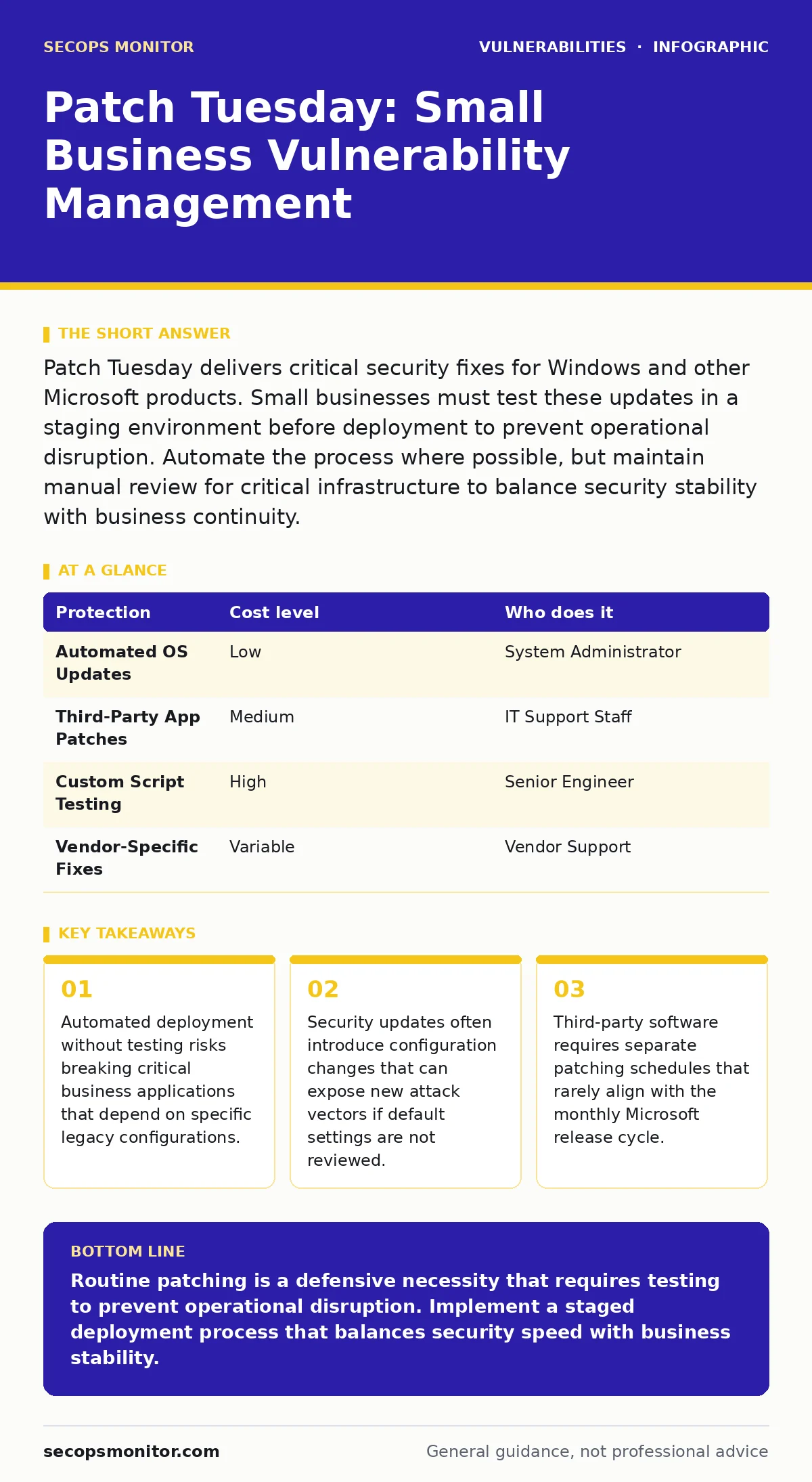
Patch Tuesday delivers critical security fixes for Windows and other Microsoft products. Small businesses must test these updates in a staging environment before deployment to prevent operational disruption. Automate the process where possible, but maintain manual review for critical infrastructure to balance security stability with business continuity.
The Mechanics of Scheduled Updates
Patch Tuesday refers to the second Tuesday of each month when Microsoft releases security updates. This predictable schedule allows organizations to plan maintenance windows. The mechanism behind this is the cumulative nature of modern updates. Each release contains all previous security fixes for that month. This reduces the complexity of tracking individual patches. However, this predictability also informs attackers. Threat actors monitor these release dates closely. They scan the internet for systems that have not yet applied the new fixes. This creates a narrow window of heightened risk immediately after release.
Small organizations often underestimate the volume of changes. A single update may modify system libraries, kernel components, and service behaviors. These changes can interact unexpectedly with custom scripts or third-party applications. The trade-off is clear. Immediate patching reduces the attack surface. Delayed patching preserves operational stability. You must find the balance. Testing in a non-production environment is the standard method for achieving this balance. This step identifies compatibility issues before they affect users.
Operational Costs for Small Teams
Small businesses lack the dedicated security operations centers found in large enterprises. The cost of patching is not just the time spent clicking buttons. It includes the downtime associated with reboots. It includes the troubleshooting required when an update breaks a process. It includes the risk of data corruption if the update fails mid-installation. You must account for these hidden costs when planning your strategy.
| Protection | Cost level | Who does it |
|---|---|---|
| Automated OS Updates | Low | System Administrator |
| Third-Party App Patches | Medium | IT Support Staff |
| Custom Script Testing | High | Senior Engineer |
| Vendor-Specific Fixes | Variable | Vendor Support |
The table above illustrates the distribution of effort. Operating system updates are often automated. Third-party applications require manual intervention. Custom scripts need rigorous testing. Vendor-specific fixes depend on external support. Small teams must prioritize based on exposure. Internet-facing servers require immediate attention. Internal workstations can follow a slower cycle. This tiered approach manages risk without overwhelming limited resources.
The Third-Party Patching Gap
Microsoft updates only cover Microsoft products. Your environment likely includes browsers, PDF readers, and office suites from other vendors. These third-party applications often contain severe vulnerabilities. Attackers frequently target these applications because they are commonly used and poorly maintained. The patching cycle for these vendors is irregular. Some release updates weekly. Others release them quarterly. You cannot rely on the Patch Tuesday schedule for these tools.
You need a centralized tool to manage third-party patches. This tool should inventory all installed software. It should check for available updates. It should deploy them during maintenance windows. Without this tool, your security posture is incomplete. The gap between Microsoft patches and third-party patches is a common entry point for attackers. Closing this gap requires consistent monitoring and automated deployment where possible.
Testing Strategies for Stability
Testing updates is not optional. It is a requirement for business continuity. You need a staging environment that mirrors production. This environment should have the same hardware specifications. It should run the same applications. It should use the same configurations. Deploy updates to this environment first. Monitor for errors. Check application performance. Verify data integrity. Only after successful testing should you deploy to production.
This process adds time to your patching cycle. It may delay deployment by several days. This delay increases the window of exposure. You must weigh the risk of an unpatched vulnerability against the risk of operational failure. For critical systems, the risk of failure often outweighs the risk of exploitation. For non-critical systems, immediate patching may be acceptable. Define your risk tolerance clearly. Document your testing procedures. Train your staff on these procedures.
Questions for Your IT Provider
If you outsource your IT management, you must verify their patching practices. Do not assume they are handling it correctly. Ask specific questions. Review their documentation. Inspect their logs. Hold them accountable for the security of your environment.
- What is your average time to patch critical vulnerabilities?
- How do you test updates before deploying them to production?
- Do you manage third-party software patches separately from OS updates?
- What is your rollback procedure if an update causes a failure?
- How do you handle end-of-life software that no longer receives updates?
These questions reveal the depth of their process. A vague answer indicates a weak process. A detailed answer with documentation indicates a mature process. You should also ask about their monitoring capabilities. They should detect failed patch installations. They should alert you to systems that remain vulnerable. This visibility is critical for maintaining security.
Managing Legacy and End-of-Life Systems
Some systems cannot be patched. Legacy applications may be incompatible with newer operating systems. Hardware may no longer be supported by the manufacturer. These systems are known as end-of-life software or hardware. They represent a significant risk. They will never receive security fixes. You must isolate these systems from the network. Use network segmentation to restrict access. Limit connectivity to only what is strictly necessary.
Regularly review your inventory for end-of-life items. Plan for replacement. Budget for upgrades. The cost of replacement is often lower than the cost of a breach. Do not ignore these systems. They are the weakest link in your chain. Address them proactively. Consult with your IT provider on mitigation strategies. Virtual patching may be an option for some legacy systems. This involves applying security rules at the network level to block known exploits.
Integrating with Broader Security Practices
Patch management does not exist in isolation. It intersects with other security disciplines. For example, vulnerability severity ratings help you prioritize which patches to apply first. Not all vulnerabilities are equal. Some allow remote code execution. Others only disclose information. Understanding the severity helps you allocate resources effectively.
Security misconfigurations can undermine even the most up-to-date systems. An update may change a default setting, introducing a new misconfiguration. You must review configurations after every major update. Threat modeling helps you identify which systems are most likely to be targeted. This allows you to focus your testing efforts on high-risk assets.
Emergency patching procedures are necessary for zero-day vulnerabilities. These are flaws that are publicly known but not yet patched. You must have a plan for rapid deployment. This plan should include bypassing normal testing procedures when the risk is extreme. Vulnerabilities in VPN gateways and application delivery controllers are particularly dangerous. These devices sit at the edge of your network.
They require immediate attention. Dynamic application security testing (DAST) can help identify issues in web applications that patches may not address. OWASP Top 10 provides a framework for understanding common web vulnerabilities. While patching addresses some of these, others require code changes. End-of-life software management is a continuous process. It requires constant vigilance.
Key takeaways
- Automated deployment without testing risks breaking critical business applications that depend on specific legacy configurations.
- Security updates often introduce configuration changes that can expose new attack vectors if default settings are not reviewed.
- Third-party software requires separate patching schedules that rarely align with the monthly Microsoft release cycle.
Routine patching is a defensive necessity that requires testing to prevent operational disruption. Implement a staged deployment process that balances security speed with business stability.
Frequently asked questions
How long should I wait before applying Patch Tuesday updates?
Wait long enough to test in a staging environment, typically 3 to 5 days, unless the vulnerability is critical and actively exploited.
Can I automate all patching without testing?
No, automation without testing risks breaking critical applications. Use automation for deployment but maintain a testing phase for validation.
What if an update breaks a critical business application?
Have a rollback plan ready. Restore the system to a pre-update snapshot or reinstall the previous version of the software immediately.
How do I handle patches for software that is no longer supported?
Isolate the system from the network, restrict access, and plan for replacement. Virtual patching via network security devices can provide temporary protection.
How this guide was produced: written by the SecOps Monitor editorial team with AI assistance, checked against the public references listed below, and reviewed when the facts change. See our editorial policy or report an error.